7.27 Writing-mode-related PropertiesWriting-mode-related Properties
The properties in this section control the setting of the
inline-progression-direction, the block-progression-direction and the
orientation of the glyphs that are placed on a baseline in the
inline-progression-direction. The "writing-mode" property sets both
the "inline-progression-direction" and the
"block-progression-direction"s.
The glyph orientation properties, "glyph-orientation-horizontal" and
"glyph-orientation-vertical" set the orientation of the glyph
relative to the default glyph orientation. The default orientation for
glyphs is with the top of the glyph oriented toward the top of the
reference area of which the glyph area is a descendant; that is, the
glyph orientation is the same as the reference-orientation of the
reference area. Glyphs that are oriented at '90' or '-90' degrees
from the reference-orientation are said to be rotated
glyphs. Glyphs that are oriented 180 degrees from the
reference-orientation are said to be inverted glyphs.
The "direction" property (which is controlled by the "unicode-bidi"
property) only affects text in which the orientation of the glyphs is
perpendicular to the dominant-baseline. For horizontal writing-modes,
the "direction" property only affects character sequences that
generate glyphs that are not rotated. For vertical writing-modes, the
"direction" property only affects character sequences that generate
glyphs that are rotated.
The following sample fragment of XML is used to illustrate the
interaction between the "writing-mode," "direction" and
"glyph-orientation-vertical" properties.
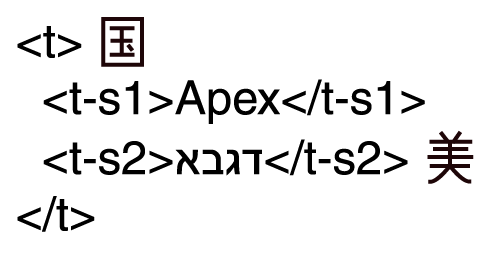
Markup of text in the next figure
In the XML markup of the figure above, the characters are represented by
their presentation form (and not their Unicode code points). The
order in which the characters are depicted is their storage order.
The Hebrew characters in the third line are (from left to right) the
first four letters of the Hebrew alphabet: aleph, beth, gimel and
daleth. The generic identifiers in the XML markup are arbitrary, but
are intended to suggest a sequence of text with two embedded text
spans.
The following figure shows the effect of specifying an assortment of
values for the "direction" and "glyph-orientation-vertical" properties
that are specified on the three elements in the above XML fragment. In
all cases, the "writing-mode" is "tb-rl". And in all cases the Unicode
BIDI algorithm
[UNICODE-TR9]
is applied to the characters that are the children or
descendants of the <t> element, sometimes with explicit directional
markup in terms of the "direction" property and other times using the
intrinsic direction properties of the underlying characters. The Unicode
BIDI algorithm is applied as the last step of refinement
(see
[refinement]
)
and before mapping the characters to glyphs and applying any
rotation due to a glyph-orientation value.
The figure shows seven possible presentations of the sample XML
fragment, one with all glyphs having a vertical orientation and six
with various combinations of a perpendicular glyph-orientation and
direction. In the figure, the correct reading order of the glyphs
(left-to-right for the Latin and right-to-left for the Hebrew
sub-sequences) is shown by the (red) arrow that is placed on the
alphabetic baseline under the glyphs.
The six combinations of the "direction" and
"glyph-orientation-vertical" properties that generated cases (2)
through (7) have the property that they preserve the correct reading
order when the glyphs are viewed upright. For some of the cases, it is
necessary to turn the page one way to view the glyphs of one language
and the opposite way to view the glyphs of the other language in an
upright position. The reading order is preserved by combining a visual
re-ordering of the glyphs using the Unicode BIDI algorithm with a
glyph-orientation that ensures the proper reading order for the
ordering of the glyphs that results from the Unicode BIDI
algorithm. Sometimes it is necessary to explicitly specify the
"direction" property to force the desired visual ordering of the
glyphs.
The property specifications that yield the six presentations
are given in the table that follows the figure.
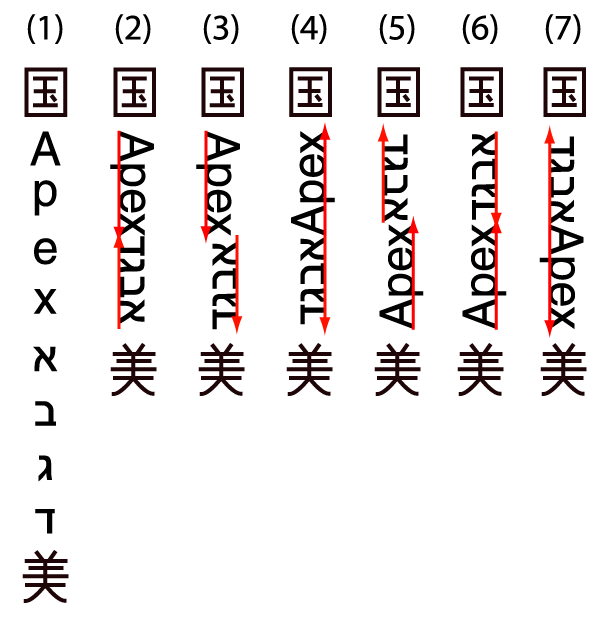
Achievable rotations of Bidi text
120
Table: Properties that produce the above figure
lefttop
| centermiddle11Elements/ Cases |
centermiddle11<t> |
centermiddle11<t-s1> |
centermiddle11<t-s2> |
lefttop
| centermiddle11 (2)
|
top11leftwriting-mode: tb-rl
glyph-orientation-vertical: 0
|
top11leftglyph-orientation-vertical: 90 |
top11leftglyph-orientation-vertical: 90 |
lefttop
| centermiddle11 (3)
|
top11leftwriting-mode: tb-rl
glyph-orientation-vertical: 0
|
top11leftglyph-orientation-vertical: 90 |
top11leftglyph-orientation-vertical: -90
unicode-bidi: bidi-override
direction: ltr
|
lefttop
| centermiddle11 (4)
|
top11leftwriting-mode: tb-rl
glyph-orientation-vertical: 0
|
top11leftglyph-orientation-vertical: -90
unicode-bidi: bidi-override
direction: rtl
|
top11leftglyph-orientation-vertical: -90
unicode-bidi: bidi-override
direction: ltr
|
lefttop
| centermiddle11 (5)
|
top11leftwriting-mode: tb-rl
glyph-orientation-vertical: 0
direction: rtl
|
top11leftglyph-orientation-vertical: -90
unicode-bidi: bidi-override
|
top11leftglyph-orientation-vertical: 90 |
lefttop
| centermiddle11 (6)
|
top11leftwriting-mode: tb-rl
glyph-orientation-vertical: 0
direction: rtl
|
top11leftglyph-orientation-vertical: -90
unicode-bidi: bidi-override
|
top11leftglyph-orientation-vertical: -90
unicode-bidi: bidi-override
direction: ltr
|
lefttop
| centermiddle11 (7)
|
top11leftwriting-mode: tb-rl
glyph-orientation-vertical: 0
direction: rtl
|
top11leftglyph-orientation-vertical: 90
unicode-bidi: embed
direction: ltr
|
top11leftglyph-orientation-vertical: 90 |
NOTE:
-
Case (1) has no rotated text. This can occur either because
"glyph-orientation-vertical" is set to "0" or because it is set to
"auto" and all the characters in the string are the full width
variants of the characters. If the orientation of the all glyphs is
vertical, then there is no re-ordering of characters.
If the "writing-mode" is set to "tb-lr" or "tb-rl" then the "direction" is
set to "ltr" and correspondingly, a "writing-mode" set of "bt-lr" or
"bt-rl" sets the "direction" to "rtl". Therefore, it is only necessary
to explicitly set the "direction" property when it would be different
than that set by setting the "writing-mode"; for example, cases (5)
through (7).
-
Case (2) can either have the explicit property settings shown in the
table or the "glyph-orientation-vertical" property on the <t>
element can have the value "auto" and the English and Hebrew
characters can be half-width characters. (Of course, there are not any
half-width Hebrew characters in real Unicode.) In this case, the
re-ordering of characters comes from the bi-directional character
types that are assigned to each Unicode character: the Roman
characters have type "L" for left to right and the Hebrew characters
have type "R" for right to left.
-
Cases (5) through (7) all explicitly set the "direction" property to
"rtl". This sets the paragraph embedding level for the Unicode BIDI
algorithm to be right to left. Even though the "direction" property is
set to "rtl", the ideographic glyphs are not re-ordered because their
orientation is not perpendicular to the dominant-baseline.
-
In cases (5) and (6) for the <t-s1> element, the "unicode-bidi"
property is set to override even though there is no explicit
specification for the "direction" property. The inherited value of the
"direction" property (which is "rtl" in this case) is used.
-
In case (7) for the <t-s1> element, the "unicode-bidi" property
is set to "embed". It is not necessary to use "bidi-override" because
the bi-directional character type for the content of <t-s1> is
already "L". (Using the value "bidi-override" would have the same
effect as the "embed", however.) The embed resets the embedding level
of the content of the <t-s1> to be left to right. Even the
"embed" (and the specific setting of the "unicode-bidi" property) is
not needed because the bi-directional character type, "L" of the
English characters is sufficient to raise the embedding level and
cause them to be ordered left to right. Setting the "direction"
property to "ltr" is needed if the "unicode-bidi" property is other
than "normal" because the inherited value of "direction" is "rtl".
If paired punctuation characters, such as parentheses, had been
included in one of the text spans, then these characters may need to
be "mirrored" as described in the Unicode BIDI algorithm. Mirroring a
character means reversing the direction the character faces; for
example, mirroring a left parenthesis makes it into a right
parenthesis. This insures that the mirrored characters always face the
text they surround.
If the "glyph-orientation" of the characters to which the glyphs
correspond is "90" and the embedding level in which the characters lie
is odd, then the paired glyphs need to be mirrored. Alternatively, if
the "glyph-orientation" of the characters to which the glyphs
correspond is "-90" and the embedding level in which the characters
lie is even, then the paired glyphs need to be mirrored. In the
example above, parentheses that surround the Latin text would not be
mirrored in cases (2), (3) and (7), but would need to be mirrored in
cases (4) through (6). Conversely, parentheses that surround the
Hebrew text would not be mirrored in cases (4) through (6), but would
need to be mirrored in cases (2), (3), and (7).
Within a string of vertical text, when the value of the
"glyph-orientation-vertical" property is "90", then each affected
glyph is rotated 90 degrees clockwise. This rotation changes the way
the rotated glyph is aligned. The horizontal alignment-point of the
rotated glyph is aligned with the appropriate baseline from the
vertical baseline-table. The appropriate baseline is the baseline
identified by the "alignment-baseline" property of the character(s)
that generate the glyph area. For example, if the
"alignment-baseline" property is not explicitly specified, Latin
glyphs are aligned to the (vertical) "alphabetic" baseline and some
Indic glyphs are aligned to the (vertical) "hanging" baseline.
NOTE:
If a glyph, such as a ligature or syllabic glyph, is generated from
more than one character, then all those characters must have
the same value for the "alignment-baseline" property.
The positions of the (vertical) baselines are chosen to insure that
the rotated glyphs will not protrude too far (if at all) outside the
line area for the vertical line when the "line-stacking-strategy"
property has the value "line-height" or "font-height". In this case,
we will say the rotated text is well aligned in the
vertical line area.
To preserve the property that rotated text in a vertical line is well
aligned when the "glyph-orientation-vertical" property value is
"-90", the vertical baseline-table must be reflected
before the rotated text is aligned. Let C be the value of the offset
to the "central" baseline in the baseline-table. A baseline-table is
reflected by negating every offset in the baseline table (where
negating "-N" yields "N") and adding 2 times C to each of the negated
offsets. The "central" baseline is defined in
[area-alignment]
.
This action is called "reflecting" because the offset
from the original dominant baseline to any baseline in the reflected
baseline-table places that baseline on the opposite side of the
"central" baseline and the distance from the "central" baseline to that
baseline is the same as was from the "central" baseline to that
baseline in its original (un-reflected) position. In short, the
positions of the baselines are reflected across the
"central" baseline.
NOTE:
If X is the offset of baseline X and C is
the offset of the "central" baseline, then -X+2*C = C+(C-X)
. C+(C-X) is the offset of the "central" baseline plus the
distance between the "central" baseline and baseline X, the baseline
being reflected.
Reflecting is necessary, because both the
"alphabetic" and the "hanging" baselines are near the outer edges of
the vertical line area. If the glyph were simply rotated 180 degrees,
then it would stick way out of the intended line area. This is
prevented by reflecting the baselines for glyphs that are perpendicular
to the dominant baseline and that are rotated 180 degrees from the
direction for which that baseline was intended. This last statement
applies as much to horizontal baselines as it does to vertical
baselines.
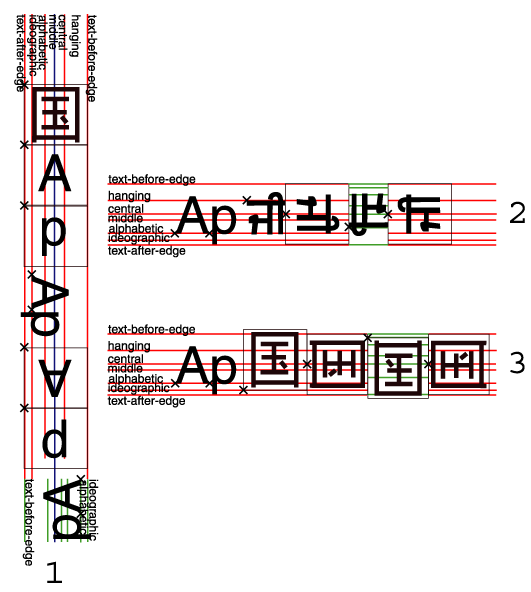
The figure illustrates the positioning of rotated and inverted glyphs
in both vertical and horizontal writing-modes. The three examples show
first some glyphs typical of the writing mode and then some atypical
glyphs in each of the possible orientations, 0, 90, 180 and -90
degrees, in that order. The alignment-point for each glyph is shown as
a small "x" whose center is at the alignment-point.
Example 1 shows the "tb-rl" vertical writing-mode. It has the
ideographic glyph for "country" as its normal glyph and the two
letters sequence, "Ap" as the glyphs that are rotated. Note that in
the default orientation (0 degrees) and in the inverted orientation,
the full width Latin glyphs are used; in the two other orientations,
the proportional Latin glyphs are used. There is a small amount of
white space between the proportional and the full width Latin
glyphs. The dominant baseline is the "central" baseline which is shown
in blue. The reflected baseline table is shown for the last (-90
degree) rotation. Note that the position of the "central" baseline
does not change when the baseline table is reflected. For the inverted
glyphs and the glyphs with a -90 degree rotation, the start-edge of
the rotated glyph is on the opposite side from where it is in the
un-rotated glyph; hence, the alignment-point on that start edge is not
on the edge where the font tables normally place it.
Examples 2 and 3 show the "lr-tb" horizontal writing-mode. They have
the Latin glyph sequence, "Ap" as their normal glyphs. Example 2
rotates the syllabic Gurmukhi glyph for "ji" and example 3 rotates
the ideographic glyph for "country". In example 2, the whole syllabic
glyph is rotated as in indivisible unit. For the 90 and -90 degree
rotations, the vertical alignment-point, aligning to the "central"
baseline, is used in both Examples. Similarly, for the inverted glyph,
the baseline table is reflected. For the glyphs with a 90 degree
rotation and the inverted glyphs, the start-edge of the rotated glyph
is on the opposite side from where it is in the un-rotated glyph;
hence, the alignment-point on that start edge is not on the edge where
the font tables normally place it.
"direction"
CSS2 Definition:
0prop-summary
lefttop| 11lefttopValue: | 11lefttopltr | rtl | inherit |
lefttop| 11lefttopInitial: | 11lefttopltr |
lefttop| 11lefttopApplies to: | 11lefttopall elements, but see prose |
lefttop| 11lefttopInherited: | 11lefttopyes |
lefttop| 11lefttopPercentages: | 11lefttopN/A |
lefttop| 11lefttopMedia: | 11lefttopvisual |
CSS2 Reference:
[
"direction" property
]
http://www.w3.org/TR/REC-CSS2/visuren.html#propdef-direction
This property specifies the base writing direction of blocks
and the direction of embeddings and overrides
(see
[UNICODE-TR9]
)
for the Unicode BIDI algorithm. In addition, it specifies
the direction of table column layout, the direction of horizontal overflow,
and the position of an incomplete last line in a block in case of
'text-align: justify'.
Values for this property have the following meanings:
-
ltr
-
Left to right direction.
-
rtl
-
Right to left direction.
For the 'direction' property to have any effect on inline-level
elements, the 'unicode-bidi' property's value must be 'embed' or
'override'.
NOTE:
The 'direction' property, when specified for table column elements,
is not inherited by cells in the column since columns don't exist
in the document tree. Thus, CSS cannot easily capture the "dir"
attribute inheritance rules described in [HTML40], section 11.3.2.1.
XSL modifications to the CSS definition:
-
The specific use of "direction" and "unicode-bidi" on inline
objects is to set the inline-progression-direction to be used by the Unicode
BIDI algorithm. This direction may override the
inline-progression-direction determined by the current writing-mode
and the implicit direction determined by the Unicode BIDI
algorithm.
-
To insure consistency with the "writing-mode" property, the "direction"
property is initialized to the value that sets the same
inline-progression-direction as is set by the "writing-mode" property
whenever that "writing-mode" property sets that direction. If the
"direction" property is explicitly specified on the same formatting object the
value of the "direction" property will override the
inline-progression-direction set by the "writing-mode".
-
This property only has an effect on text in which the
orientation of the glyphs is perpendicular to the
inline-progression-direction. Therefore, vertical ideographic text with the initial value for "glyph-orientation-vertical" is
not affected by this property; vertical text for which the "glyph-orientation-vertical" property has the value
of "90" or "-90" degrees is affected.
NOTE:
When the inline-progression-direction is "tb", as is typical for vertical text, then this corresponds to a "lr" inline-progression-direction for text with a glyph-orientation of '90' degrees and an "rl" inline-progression-direction for text with a glyph-orientation of "-90" degrees.
-
The "writing-mode" property is used on formatting objects that define
blocks that generate reference-areas, including inline-containers. It
establishes both the block-progression-direction and the
inline-progression-direction. The "direction" property only changes
the inline-progression-direction and is used primarily for formatting
objects that generate inline-areas that are not also reference
areas. Use of the "direction" property for other formatting objects is
deprecated in this specification.
-
When mapping CSS to XSL, the XSL "writing-mode" property
should be used rather than the "direction" property for all block-level
directionality control. XSL's "writing-mode" should also be used
for any inline-container or block-container
objects. The "direction" property should be used only for control/overrides of
the Unicode BIDI algorithm on bidi-override formatting
objects.
Implementations must support the values of the "direction"
values defined in this Recommendation that are required to support
the "writing-mode" values supported by the implementation.
glyph-orientation-horizontal[top]
"glyph-orientation-horizontal"
XSL Definition:
0prop-summary
lefttop| 11lefttopValue: | 11lefttop<angle> | inherit |
lefttop| 11lefttopInitial: | 11lefttop0deg |
lefttop| 11lefttopApplies to: | 11lefttopfo:character |
lefttop| 11lefttopInherited: | 11lefttopyes |
lefttop| 11lefttopPercentages: | 11lefttopN/A |
lefttop| 11lefttopMedia: | 11lefttopvisual |
Values have the following meanings:
-
<angle>
-
The angle is restricted to 0, 90, 180, and 270 degrees.
The User Agent shall round the value of the angle to the closest
of the permitted values.
A value of "0deg" indicates that all glyphs are set with the top
of the glyphs toward the top of the reference-area. The top of the reference-area
is defined by the reference-area's reference-orientation.
A value of "90deg" indicates a rotation of 90-degrees clockwise
from the "0deg" orientation.
This property specifies the orientation
of glyphs relative to the path direction specified by the 'writing-mode'.
This property is applied only to text written
in a horizontal writing-mode.
The value of this property affects both the alignment and width of the glyph-areas generated for the affected glyphs. If a glyph is oriented so that it is not perpendicular to the dominant-baseline, then the vertical
alignment-point of the rotated glyph is aligned with the
alignment-baseline appropriate to that glyph. The baseline to which the rotated glyph is aligned is
the (horizontal) baseline identified by the "alignment-baseline" for the
script to which the glyph belongs. The width of the glyph-area is determined from the vertical width font characteristic for the glyph.
glyph-orientation-vertical[top]
"glyph-orientation-vertical"
XSL Definition:
0prop-summary
lefttop| 11lefttopValue: | 11lefttopauto | <angle> | inherit |
lefttop| 11lefttopInitial: | 11lefttopauto |
lefttop| 11lefttopApplies to: | 11lefttopfo:character |
lefttop| 11lefttopInherited: | 11lefttopyes |
lefttop| 11lefttopPercentages: | 11lefttopN/A |
lefttop| 11lefttopMedia: | 11lefttopvisual |
Values have the following meanings:
-
auto
-
-
Fullwidth ideographic
and fullwidth Latin text (excluding ideographic punctuation) will
be set with a glyph-orientation of 0-degrees.
Ideographic punctuation and other ideographic characters having
alternate horizontal and vertical forms will use the vertical form
of the glyph.
-
Text which is not fullwidth will be set with a glyph-orientation
of 90-degrees.
This reorientation rule applies only to the first-level non-ideographic
text. All further embedding of writing-modes or BIDI processing
will be based on the first-level rotation.
NOTE:
-
This is equivalent to having set the non-ideographic
text string horizontally honoring the bidi-rule, then rotating the
resultant sequence of inline-areas (one area for each change of
glyph direction) 90-degrees clockwise.
It should be noted that text set in this "rotated" manner may
contain ligatures or other glyph combining and reordering common
to the language and script. (This "rotated" presentation form does
not disable auto-ligature formation or similar context-driven variations.)
-
The determination of which characters should be auto-rotated
may vary across User Agents. The determination is based on a complex
interaction between country, language, script, character properties,
font, and character context. It is suggested that one consult the
Unicode TR 11 and the various JIS or other national
standards.
-
<angle>
-
The angle is restricted to 0, 90, 180, and 270 degrees.
The User Agent shall round the value of the angle to the closest
of the permitted values.
A value of "0deg" indicates that all glyphs are set with the top
of the glyphs toward the top of the reference-area. The top of the reference-area
is defined by the reference-area's reference-orientation.
A value of "90deg" indicates a rotation of 90-degrees clockwise
from the "0deg" orientation.
This property specifies the orientation
of glyphs relative to the path direction specified by the writing-mode.
This property is applied only text written
with an inline-progression-direction
top-to-bottom or
bottom-to-top.
Its most common usage is to differentiate between the preferred
orientation of alphabetic text in vertically written Japanese documents
(glyph-orientation="auto") vs. the orientation of alphabetic text in
western signage and advertising (glyph-orientation="0deg").
The value of this property affects both the alignment and width of the glyph-areas generated for the affected glyphs. If a glyph is oriented so that it is perpendicular to the dominant-baseline, then the horizontal
alignment-point of the rotated glyph is aligned with the
alignment-baseline appropriate to that glyph. The baseline to which the rotated glyph is aligned is
the (vertical) baseline identified by the "alignment-baseline" for the
script to which the glyph belongs. The width of the glyph-area is determined from the horizontal width font characteristic for the glyph.
text-altitude[top]
"text-altitude"
XSL Definition:
0prop-summary
lefttop| 11lefttopValue: | 11lefttopuse-font-metrics | <length> | <percentage> | inherit |
lefttop| 11lefttopInitial: | 11lefttopuse-font-metrics |
lefttop| 11lefttopApplies to: | 11lefttopfo:block, fo:character, fo:leader, fo:page-number, fo:page-number-citation |
lefttop| 11lefttopInherited: | 11lefttopno |
lefttop| 11lefttopPercentages: | 11lefttoprefer to font's em-height |
lefttop| 11lefttopMedia: | 11lefttopvisual |
Values have the following meanings:
-
use-font-metrics
-
Uses a value for the "height"
of the font above the dominant baseline,
calculated as the distance between the text-before baseline and
the dominant baseline,
obtained from
the nominal font for fo:block, fo:character, and
fo:leader when the leader-pattern does not have
the value "use-content".
For fo:leader, when the
leader-pattern has the value "use-content",
it is obtained from the nominal font of the first child.
Conforming implementations may choose as an
actual value any value in the range of text-altitudes used
by fonts of the same script and font-size, instead of the values
from the font data.
-
<length>
-
Replaces the "height" value found in the font.
Specifies the "height" to be used for the ascent
above the dominant baseline.
"text-depth"
XSL Definition:
0prop-summary
lefttop| 11lefttopValue: | 11lefttopuse-font-metrics | <length> | <percentage> | inherit |
lefttop| 11lefttopInitial: | 11lefttopuse-font-metrics |
lefttop| 11lefttopApplies to: | 11lefttopfo:block, fo:character, fo:leader, fo:page-number, fo:page-number-citation |
lefttop| 11lefttopInherited: | 11lefttopno |
lefttop| 11lefttopPercentages: | 11lefttoprefer to font's em-height |
lefttop| 11lefttopMedia: | 11lefttopvisual |
Values have the following meanings:
-
use-font-metrics
-
Uses a value for the "depth"
of the font below the baseline,
calculated as the distance between
the dominant baseline and the text-after baseline,
obtained from
the nominal font for fo:block, fo:character, and
fo:leader when the leader-pattern does not have
the value "use-content".
For fo:leader, when the
leader-pattern has the value "use-content",
it is obtained from the nominal font of the first child.
Conforming implementations may choose as an
actual value any value in the range of text-depths used
by fonts of the same script and font-size, instead of the values
from the font data.
-
<length>
-
Replaces the "depth" value found in the font.
Specifies the "depth" to be used for the descent
below the dominant baseline.
unicode-bidi[top]
"unicode-bidi"
CSS2 Definition:
0prop-summary
lefttop| 11lefttopValue: | 11lefttopnormal | embed | bidi-override | inherit |
lefttop| 11lefttopInitial: | 11lefttopnormal |
lefttop| 11lefttopApplies to: | 11lefttopall elements, but see prose |
lefttop| 11lefttopInherited: | 11lefttopno |
lefttop| 11lefttopPercentages: | 11lefttopN/A |
lefttop| 11lefttopMedia: | 11lefttopvisual |
CSS2 Reference:
[
"unicode-bidi" property
]
http://www.w3.org/TR/REC-CSS2/visuren.html#propdef-unicode-bidi
Values have the following meanings:
-
normal
-
The element does not open an additional
level of embedding with respect to the bidirectional algorithm.
For inline-level elements, implicit reordering works across element
boundaries.
-
embed
-
If the element is inline-level, this
value opens an additional level of embedding with respect to the
bidirectional algorithm. The direction of this embedding level is given
by the 'direction' property. Inside the element, reordering is done
implicitly. This corresponds to adding a LRE (U+202A; for 'direction:
ltr') or RLE (U+202B; for 'direction: rtl') at the start of the
element and a PDF (U+202C) at the end of the element.
-
bidi-override
-
If the element is inline-level or
a block-level element that contains only inline-level elements,
this creates an override. This means that inside the element, reordering
is strictly in sequence according to the 'direction' property; the
implicit part of the bidirectional algorithm is ignored. This corresponds
to adding a LRO (U+202D; for 'direction: ltr') or RLO (U+202E; for
'direction: rtl') at the start of the element and a PDF (U+202C)
at the end of the element.
The final order of characters in each
block-level element is the same as if the bidi control codes had
been added as described above, markup had been stripped, and the
resulting character sequence had been passed to an implementation
of the Unicode bidirectional algorithm for plain text that produced
the same line-breaks as the styled text. In this process, non-textual
entities such as images are treated as neutral characters, unless
their 'unicode-bidi' property has a value other than 'normal', in
which case they are treated as strong characters in the 'direction'
specified for the element.
Please note that in order to be able to flow inline boxes in
a uniform direction (either entirely left-to-right or entirely right-to-left),
more inline boxes (including anonymous inline boxes) may have to
be created, and some inline boxes may have to be split up and reordered
before flowing.
Because the Unicode algorithm has a limit of 15 levels of embedding,
care should be taken not to use 'unicode-bidi' with a value other
than 'normal' unless appropriate. In particular, a value of 'inherit'
should be used with extreme caution. However, for elements that
are, in general, intended to be displayed as blocks, a setting of
'unicode-bidi: embed' is preferred to keep the element together
in case display is changed to inline.
XSL modifications to the CSS definition:
The phrasing of the first paragraph of the general description
(following the value breakouts) should read "The final order of
presentation of the characters...".
In Unicode 3.0, the Unicode Consortium has increased the limit of
the levels of embedding to 61 (definition BD2 in
[UNICODE-TR9]
).
Fallback:
If it is not possible to present the characters in the correct order,
then the User Agent should display either
a 'missing character' glyph
or display some indication that the content cannot be correctly rendered.
writing-mode[top]
"writing-mode"
XSL Definition:
0prop-summary
lefttop| 11lefttopValue: | 11lefttoplr-tb | rl-tb | tb-rl | lr | rl | tb | inherit |
lefttop| 11lefttopInitial: | 11lefttoplr-tb |
lefttop| 11lefttopApplies to: | 11lefttopsee prose |
lefttop| 11lefttopInherited: | 11lefttopyes (see prose) |
lefttop| 11lefttopPercentages: | 11lefttopN/A |
lefttop| 11lefttopMedia: | 11lefttopvisual |
NOTE:
This version of the writing-mode property covers the base writing-modes
that are used as the official languages of the United Nations. For
information regarding additional writing-modes, please see
[writing-mode-add]
.
Values have the following meanings:
-
lr-tb
-
Inline components and text within
a line are written left-to-right. Lines and blocks are placed top-to-bottom.
NOTE:
Typically, this is the writing-mode for normal
"alphabetic" text.
Establishes the following directions:
-
inline-progression-direction to left-to-right
If any right-to-left reading characters are present in the text,
the inline-progression-direction for glyph-areas may be
further modified by the Unicode BIDI algorithm.
-
block-progression-direction to top-to-bottom
-
shift-direction to bottom-to-top
-
rl-tb
-
Inline components and text within
a line are written right-to-left. Lines and blocks are placed top-to-bottom.
NOTE:
Typically, this writing mode is used in Arabic and Hebrew text.
Establishes the following directions:
-
inline-progression-direction to right-to-left
If any left-to-right reading characters or numbers are present
in the text, the inline-progression-direction for
glyph-areas may
be further modified by the Unicode BIDI algorithm.
-
block-progression-direction to top-to-bottom
-
shift-direction to bottom-to-top
-
tb-rl
-
Inline components and text within
a line are written top-to-bottom. Lines and blocks are placed right-to-left.
NOTE:
Typically, this writing mode is used in Chinese and Japanese
text.
Establishes the following directions:
-
inline-progression-direction to top-to-bottom
-
block-progression-direction to right-to-left
-
shift-direction to left-to-right
-
lr
-
Shorthand for lr-tb.
-
rl
-
Shorthand for rl-tb.
-
tb
-
Shorthand for tb-rl.
The "writing-mode" property applies
only to formatting objects that
set up
a reference-area (for XSL these are: fo:simple-page-master, fo:region-*,
fo:table, fo:block-container, and fo:inline-container.
Each value of writing-mode sets all three of the direction
traits indicated in each of the value descriptions above on the
reference-area. (See the area model for a description of the direction
traits and their usage.)
-
When "writing-mode" is applied to the simple-page-master,
it is used to determine the placement of the five regions on the master.
-
When "writing-mode" is applied to the fo:region-*, it defines
the column-progression within each region. The inline-progression-direction
is used to determine the stacking direction for columns (and the
default flow order of text from column-to-column).
-
To change the "writing-mode" within an fo:flow or fo:static-content,
either the fo:block-container or the fo:inline-container,
as appropriate, should be used.
If one only wishes to change the inline-progression-direction
to override the Unicode BIDI-rule, one need not use an fo:inline-container.
Instead, one may use the "direction" property on
the fo:bidi-override.
-
When "writing-mode" is applied to the fo:table, it controls
the layout of the rows and columns. Table-rows use the
block-progression-direction
as the row-stacking direction. The inline-progression-direction
is used to determine the stacking direction for columns (and cell
order within the row).
Implementations must support at least one of the "writing-mode"
values defined in this Recommendation.
|
