
Table of contentsAppendices |
6.7 Formatting Objects for TablesFormatting Objects for TablesIntroduction[top]IntroductionThere are nine formatting objects used to construct tables: fo:table-and-caption, fo:table, fo:table-column, fo:table-caption, fo:table-header, fo:table-footer, fo:table-body, fo:table-row, and fo:table-cell. The result tree structure is shown below. 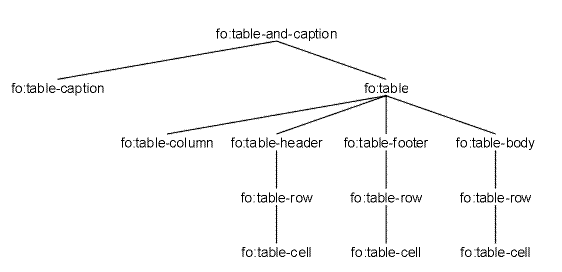
Tree Representation of the Formatting Objects for Tables Examples[top]ExamplesSimple Table, Centered and Indented[top]Simple Table, Centered and IndentedInput sample: <doc> <table> <caption><p>Caption for this table</p></caption> <tgroup cols="3" width="325pt"> <colspec colwidth="100pt"/> <colspec colwidth="150pt"/> <colspec colwidth="75pt"/> <tbody> <row> <entry><p>Cell 1</p></entry> <entry><p>Cell 2</p></entry> <entry><p>Cell 3</p></entry> </row> </tbody> </tgroup> </table> </doc> The table and its caption is centered in the available space between the following indents: start-indent="100pt" and end-indent="0pt". The centering and indent is not desired for the content of the caption and the cells. XSL Stylesheet:
<?xml version='1.0'?>
<xsl:stylesheet xmlns:xsl="http://www.w3.org/1999/XSL/Transform"
                xmlns:fo="http://www.w3.org/1999/XSL/Format"
                version='1.0'>

<xsl:attribute-set name="inside-table">
  <xsl:attribute name="start-indent">0pt</xsl:attribute>
  <xsl:attribute name="text-align">start</xsl:attribute>
</xsl:attribute-set>

<xsl:template match="p">
  <fo:block>
    <xsl:apply-templates/>
  </fo:block>
</xsl:template>

<xsl:template match="table">
  <fo:table-and-caption text-align="center" start-indent="100pt">
    <xsl:apply-templates/>
  </fo:table-and-caption>
</xsl:template>

<xsl:template match="caption">
  <fo:table-caption xsl:use-attribute-sets="inside-table">
    <xsl:apply-templates/>
  </fo:table-caption>
</xsl:template>

<xsl:template match="tgroup">
  <fo:table width="{@width}" table-layout="fixed">
    <xsl:apply-templates/>
  </fo:table>
</xsl:template>

<xsl:template match="colspec">
  <fo:table-column column-width="{@colwidth}">
    <xsl:attribute name="column-number">
      <xsl:number count="colspec"/>
    </xsl:attribute>
  </fo:table-column>
</xsl:template>

<xsl:template match="tbody">
  <fo:table-body xsl:use-attribute-sets="inside-table">
    <xsl:apply-templates/>
  </fo:table-body>
</xsl:template>

<xsl:template match="row">
  <fo:table-row>
    <xsl:apply-templates/>
  </fo:table-row>
</xsl:template>

<xsl:template match="entry">
  <fo:table-cell>
    <xsl:apply-templates/>
  </fo:table-cell>
</xsl:template>

</xsl:stylesheet>
Result Instance: elements and attributes in the fo: namespace
<fo:table-and-caption text-align="center" start-indent="100pt">

  <fo:table-caption start-indent="0pt" text-align="start">
    <fo:block>Caption for this table
    </fo:block>
  </fo:table-caption>

  <fo:table width="325pt" table-layout="fixed">

    <fo:table-column column-width="100pt" column-number="1">
    </fo:table-column>
    <fo:table-column column-width="150pt" column-number="2">
    </fo:table-column>
    <fo:table-column column-width="75pt" column-number="3">
    </fo:table-column>

    <fo:table-body start-indent="0pt" text-align="start">

    <fo:table-row>

    <fo:table-cell>
    <fo:block>Cell 1
    </fo:block>
    </fo:table-cell>
    <fo:table-cell>
    <fo:block>Cell 2
    </fo:block>
    </fo:table-cell>
    <fo:table-cell>
    <fo:block>Cell 3
    </fo:block>
    </fo:table-cell>

    </fo:table-row>

    </fo:table-body>

  </fo:table>

</fo:table-and-caption>
Simple Table with Relative Column-width Specifications[top]Simple Table with Relative Column-width SpecificationsThis example is using a simple, "Oasis-table-model-like", markup for the table elements. The column-widths are specified using full relative column-width specification. Input sample: <doc> <table> <tgroup cols="3"> <colspec colname="col1" colwidth="1*"/> <colspec colname="col2" colwidth="2*+2pi"/> <colspec colname="col3" colwidth="72"/> <tbody> <row> <entry colnum="1" valign="top"><p>Cell 1</p></entry> <entry colnum="2" valign="middle" align="center"><p>Cell 2</p></entry> <entry colnum="3" align="center"><p>Cell 3</p></entry> </row> </tbody> </tgroup> </table> </doc> XSL Stylesheet:
<?xml version='1.0'?>
<xsl:stylesheet xmlns:xsl="http://www.w3.org/1999/XSL/Transform"
                xmlns:fo="http://www.w3.org/1999/XSL/Format"
                version='1.0'>

<xsl:template match="p">
  <fo:block>
    <xsl:apply-templates/>
  </fo:block>
</xsl:template>

<xsl:template match="table">
  <fo:table width="12cm" table-layout="fixed">
    <xsl:apply-templates/>
  </fo:table>
</xsl:template>

<xsl:template match="colspec">
  <fo:table-column>
    <xsl:attribute name="column-number">
      <xsl:number count="colspec"/>
    </xsl:attribute>
    <xsl:attribute name="column-width">
      <xsl:call-template name="calc.column.width">
        <xsl:with-param name="colwidth">
          <xsl:value-of select="@colwidth"/>
        </xsl:with-param>
      </xsl:call-template>
    </xsl:attribute>
  </fo:table-column>
</xsl:template>

<xsl:template match="tbody">
  <fo:table-body>
    <xsl:apply-templates/>
  </fo:table-body>
</xsl:template>

<xsl:template match="row">
  <fo:table-row>
    <xsl:apply-templates/>
  </fo:table-row>
</xsl:template>

<xsl:template match="entry">
  <fo:table-cell column-number="{@colnum}">
    <xsl:if test="@valign">
      <xsl:choose>
        <xsl:when test="@valign='middle'">
          <xsl:attribute name="display-align">center</xsl:attribute>
        </xsl:when>
        <xsl:otherwise>
          <xsl:attribute name="display-align">
            <xsl:value-of select="@valign"/>
          </xsl:attribute>
        </xsl:otherwise>
      </xsl:choose>
    </xsl:if>
    <xsl:if test="@align">
      <xsl:attribute name="text-align">
        <xsl:value-of select="@align"/>
      </xsl:attribute>
    </xsl:if>
    <xsl:apply-templates/>
  </fo:table-cell>
</xsl:template>


<xsl:template name="calc.column.width">
<!-- **
     * <p>Calculate an XSL FO table column-width specification from a
     * full relative table column-width specification.</p>
     *
     * <p>Table column-widths are in the following basic
     * forms:</p>
     *
     * <ul>
     * <li><b>99.99units</b>, a fixed length-specifier.</li>
     * <li><b>99.99</b>, a fixed length-specifier without any units.</li>
     * <li><b>99.99*</b>, a relative length-specifier.</li>
     * <li><b>99.99*+99.99units</b>, a combination of both.</li>
     * </ul>
     *
     * <p>The units are points (pt), picas (pi), centimeters (cm),
     * millimeters (mm), and inches (in). These are the same units as XSL,
     * except that XSL abbreviates picas "pc" instead of "pi". If a length
     * specifier has no units, the default unit (pt) is assumed.</p>
     *
     * <p>Relative length-specifiers are represented in XSL with the
     * proportional-column-width() function.</p>
     *
     * <p>Here are some examples:</p>
     *
     * <ul>
     * <li>"36pt" becomes "36pt"</li>
     * <li>"3pi" becomes "3pc"</li>
     * <li>"36" becomes "36pt"</li>
     * <li>"3*" becomes "proportional-column-width(3)"</li>
     * <li>"3*+2pi" becomes "proportional-column-width(3)+2pc"</li>
     * <li>"1*+2" becomes "proportional-column-width(1)+2pt"</li>
     * </ul>
     *
     * @param colwidth The column width specification.
     *
     * @returns The XSL column width specification.
     * -->
  <xsl:param name="colwidth">1*</xsl:param>

  <!-- Ok, the colwidth could have any one of the following forms: -->
  <!--        1*       = proportional width -->
  <!--     1unit       = 1.0 units wide -->
  <!--         1       = 1pt wide -->
  <!--  1*+1unit       = proportional width + some fixed width -->
  <!--      1*+1       = proportional width + some fixed width -->

  <!-- If it has a proportional width, translate it to XSL -->
  <xsl:if test="contains($colwidth, '*')">
    <xsl:text>proportional-column-width(</xsl:text>
    <xsl:value-of select="substring-before($colwidth, '*')"/>
    <xsl:text>)</xsl:text>
  </xsl:if>

  <!-- Now get the non-proportional part of the specification -->
  <xsl:variable name="width-units">
    <xsl:choose>
      <xsl:when test="contains($colwidth, '*')">
        <xsl:value-of
             select="normalize-space(substring-after($colwidth, '*'))"/>
      </xsl:when>
      <xsl:otherwise>
        <xsl:value-of select="normalize-space($colwidth)"/>
      </xsl:otherwise>
    </xsl:choose>
  </xsl:variable>

  <!-- Now the width-units could have any one of the following forms: -->
  <!--                 = <empty string> -->
  <!--     1unit       = 1.0 units wide -->
  <!--         1       = 1pt wide -->
  <!-- with an optional leading sign -->

  <!-- Get the width part by blanking out the units part and discarding -->
  <!-- white space. -->
  <xsl:variable name="width"
       select="normalize-space(translate($width-units,
                                         '+-0123456789.abcdefghijklmnopqrstuvwxyz',
                                         '+-0123456789.'))"/>

  <!-- Get the units part by blanking out the width part and discarding -->
  <!-- white space. -->
  <xsl:variable name="units"
       select="normalize-space(translate($width-units,
                                         'abcdefghijklmnopqrstuvwxyz+-0123456789.',
                                         'abcdefghijklmnopqrstuvwxyz'))"/>

  <!-- Output the width -->
  <xsl:value-of select="$width"/>

  <!-- Output the units, translated appropriately -->
  <xsl:choose>
    <xsl:when test="$units = 'pi'">pc</xsl:when>
    <xsl:when test="$units = '' and $width != ''">pt</xsl:when>
    <xsl:otherwise><xsl:value-of select="$units"/></xsl:otherwise>
  </xsl:choose>
</xsl:template>

</xsl:stylesheet>
Result Instance: elements and attributes in the fo: namespace
<fo:table width="12cm" table-layout="fixed">
  <fo:table-column column-number="1" column-width="proportional-column-width(1)">
  </fo:table-column>
  <fo:table-column column-number="2" column-width="proportional-column-width(2)+2pc">
  </fo:table-column>
  <fo:table-column column-number="3" column-width="72pt">
  </fo:table-column>
  <fo:table-body>
    <fo:table-row>
      <fo:table-cell column-number="1" display-align="top">
        <fo:block>Cell 1
        </fo:block>
      </fo:table-cell>
      <fo:table-cell column-number="2" display-align="center" text-align="center">
        <fo:block>Cell 2
        </fo:block>
      </fo:table-cell>
      <fo:table-cell column-number="3" text-align="center">
        <fo:block>Cell 3
        </fo:block>
      </fo:table-cell>
    </fo:table-row>
  </fo:table-body>
</fo:table>
fo:table-and-caption[top]fo:table-and-captionCommon Usage: The fo:table-and-caption flow object is used for formatting a table together with its caption. NOTE: NOTE: Areas: The fo:table-and-caption formatting object generates one or more normal block-areas. The fo:table-and-caption returns these areas, any page-level-out-of-line areas, and any reference-level-out-of-line areas returned by the children of the fo:table-and-caption. Constraints: No area may have more than one normal child area returned by the same fo:table-and-caption formatting object. The children of the areas generated by the fo:table-and-caption are one or two areas; one for the table caption and one for the table itself. These are positioned relative to each other as specified by the caption-side trait. They are placed relative to the content-rectangle of the generated area as specified by the text-align trait. Contents: (table-caption?,table) In addition this formatting object may have a sequence of zero or more fo:markers as its initial children. The following properties apply to this formatting object:
fo:table[top]fo:tableCommon Usage: The fo:table flow object is used for formatting the tabular material of a table. The fo:table flow object and its child flow objects model the visual layout of a table in a "row primary" manner. A complete table may be seen as consisting of a grid of rows and columns where each cell occupies one or more grid units in the row-progression-direction and column-progression-direction. The table content is divided into a header (optional), footer (optional), and one or more bodies. Properties specify if the headers and footers should be repeated at a break in the table. Each of these parts occupies one or more rows in the table grid. Areas: The fo:table formatting object generates and returns one or more normal block-areas. In addition the fo:table returns any page-level-out-of-line areas, and any reference-level-out-of-line areas returned by the children of the fo:table. The areas generated and returned by the fo:table formatting object have as children:
These areas have a z-index controlling the rendering order determined in accordance with 17.5.1 of the CSS2 specification ( [http://www.w3.org/TR/REC-CSS2/tables.html#table-layers"] ). NOTE: Trait Derivation: The areas generated and returned by the fo:table formatting object have a value of "true" for the is-reference-area. The column-progression-direction and row-progression-direction are determined by the writing-mode trait. Columns use the inline-progression-direction, and rows use the block-progression-direction. The method for deriving the border traits for a table is specified by the "border-collapse" property. If the value of the "border-collapse" property is "separate" the border is composed of two components. The first, which is placed with the inside edge coincident with the outermost table grid boundary line, has the width of half the value for the "border-separation" property. It is filled in accordance with the "background" property of the fo:table. Second, outside the outermost table grid boundary line is placed, for each side of the table, a border based on a border specified on the table. If the value of the "border-collapse" property is "collapse" or "collapse-with-precedence" the border is determined, for each segment, at the cell level. NOTE: Constraints: No area may have more than one normal child area returned by the same fo:table formatting object. The inline-progression-dimension of the content-rectangle of the table is the sum of the inline-progression-dimensions of the columns in the table grid. The method used to determine these inline-progression-dimensions is governed by the values of the table-layout and the inline-progression-dimension traits in the following manner:
The automatic table layout and fixed table layout is defined in 17.5.2 of the CSS2 specification ( [http://www.w3.org/TR/REC-CSS2/tables.html#width-layout"] ). The method for determining the block-progression-dimension of the table is governed by the block-progression-dimension trait. NOTE: NOTE: NOTE: It is an error if two table-cells overlap. NOTE: Contents: (table-column*,table-header?,table-footer?,table-body+) In addition this formatting object may have a sequence of zero or more fo:markers as its initial children. The following properties apply to this formatting object:
fo:table-column[top]fo:table-columnCommon Usage: The fo:table-column auxiliary formatting object specifies characteristics applicable to table cells that have the same column and span. The most important property is the "column-width" property. Areas: The fo:table-column formatting object does not generate or return any areas. It holds a set of traits that provide constraints on the column widths and a specification of some presentation characteristics, such as background which affects the areas generated by the fo:table (see [fo_table] ). Inheritable properties may also be specified on the fo:table-column. These can be referenced by the from-table-column() function in an expression. NOTE: Constraints: None. Contents: EMPTY The following properties apply to this formatting object:
fo:table-caption[top]fo:table-captionCommon Usage: The fo:table-caption formatting object is used to contain block-level formatting objects containing the caption for the table only when using the fo:table-and-caption. Areas: The fo:table-caption formatting object generates one or more normal reference-areas. The fo:table-caption returns these reference-areas and any page-level-out-of-line areas returned by the children of the fo:table-caption. Trait Derivation: The areas generated by the fo:table-caption formatting object have a value of "true" for the is-reference-area. Constraints: For the case when the value of the caption-side trait is "before" or "after" the inline-progression-dimension of the content-rectangle of the generated reference-area is equal to the inline-progression-dimension of the content-rectangle of the reference-area that encloses it. When the value is "start" or "end" the inline-progression-dimension of the generated reference-area is constrained by the value of the inline-progression-dimension trait. When the value is "top", "bottom", "left", or "right" the value is mapped in the same way as for corresponding properties (see [compcorr] ) and the property is then treated as if the corresponding value had been specified. If the caption is to be positioned before the table, the areas generated by the fo:table-caption shall be placed in the area tree as though the fo:table-caption had a "keep-with-next" property with value "always". If the caption is to be positioned after the table, the areas generated by the fo:table-caption shall be placed in the area tree as though the fo:table-caption had a "keep-with-previous" property with value "always". No area may have more than one normal child area returned by the same fo:table-caption formatting object. The children of each normal area returned by an fo:table-caption formatting object must be normal block-areas returned by the children of the fo:table-caption, must be properly stacked, and must be properly ordered. Any reference-level-out-of-line areas returned by the children of the fo:table-caption are handled as described in [fo_float] . Contents: (%block;)+ In addition this formatting object may have a sequence of zero or more fo:markers as its initial children. The following properties apply to this formatting object:
fo:table-header[top]fo:table-headerCommon Usage: The fo:table-header formatting object is used to contain the content of the table header. Areas: The fo:table-header formatting object does not generate any areas. The fo:table-header formatting object returns the sequence of areas created by concatenating the sequences of areas returned by each of the children of the fo:table-header. Constraints: The order of concatenation of the sequences of areas returned by the children of the fo:table-header is the same order as the children are ordered under the fo:table-header. Contents: (table-row+|table-cell+) The fo:table-header has fo:table-row (one or more) as its children, or alternatively fo:table-cell (one or more). In the latter case cells are grouped into rows using the starts-row and ends-row properties. In addition this formatting object may have a sequence of zero or more fo:markers as its initial children. The following properties apply to this formatting object:
fo:table-footer[top]fo:table-footerCommon Usage: The fo:table-footer formatting object is used to contain the content of the table footer. Areas: The fo:table-footer formatting object does not generate any areas. The fo:table-footer formatting object returns the sequence of areas created by concatenating the sequences of areas returned by each of the children of the fo:table-footer. Constraints: The order of concatenation of the sequences of areas returned by the children of the fo:table-footer is the same order as the children are ordered under the fo:table-footer. Contents: (table-row+|table-cell+) The fo:table-footer has fo:table-row (one or more) as its children, or alternatively fo:table-cell (one or more). In the latter case cells are grouped into rows using the starts-row and ends-row properties. In addition this formatting object may have a sequence of zero or more fo:markers as its initial children. The following properties apply to this formatting object:
fo:table-body[top]fo:table-bodyCommon Usage: The fo:table-body formatting object is used to contain the content of the table body. Areas: The fo:table-body formatting object does not generate any areas. The fo:table-body formatting object returns the sequence of areas created by concatenating the sequences of areas returned by each of the children of the fo:table-body. Constraints: The order of concatenation of the sequences of areas returned by the children of the fo:table-body is the same order as the children are ordered under the fo:table-body. Contents: (table-row+|table-cell+) The fo:table-body has fo:table-row (one or more) as its children, or alternatively fo:table-cell (one or more). In the latter case cells are grouped into rows using the starts-row and ends-row properties. In addition this formatting object may have a sequence of zero or more fo:markers as its initial children. The following properties apply to this formatting object:
fo:table-row[top]fo:table-rowCommon Usage: The fo:table-row formatting object is used to group table-cells into rows; all table-cells in a table-row start in the same geometric row on the table grid. Areas: The fo:table-row formatting object does not generate any areas. The fo:table-row formatting object returns the sequence of areas created by concatenating the sequences of areas returned by each of the children of the fo:table-row. The fo:table-row holds a specification of some presentation characteristics, such as background which affects the areas generated by the fo:table (see [fo_table] ). Constraints: The order of concatenation of the sequences of areas returned by the children of the fo:table-row is the same order as the children are ordered under the fo:table-row. The method for determining the height of the row in the grid is governed by the row-height trait. Contents: (table-cell+) The following properties apply to this formatting object:
fo:table-cell[top]fo:table-cellCommon Usage: The fo:table-cell formatting object is used to group content to be placed in a table cell. The "starts-row" and "ends-row" properties can be used when the input data does not have elements containing the cells in each row, but instead, for example, each row starts at elements of a particular type. Areas: The fo:table-cell formatting object generates one or more normal reference-areas. The fo:table-cell returns these reference-areas and any page-level-out-of-line areas returned by the children of the fo:table-cell. Trait Derivation: The areas generated by the fo:table-cell formatting object have a value of "true" for the is-reference-area. The method for deriving the border for a cell is specified by the border-collapse trait. If the value of the border-collapse trait is "separate" the border is composed of two components. The first, which is placed with the outside edge coincident with the table grid boundary line, has the width of half the value for the border-separation trait. It is filled in accordance with the background trait of the fo:table. Inside this border is placed, for each side of the cell, a border based on a border specified on the cell or inherited. If the value of the border-collapse trait is "collapse-with-precedence" the border for each side of the cell is determined by, for each segment of a border, selecting, from all border specifications for that segment, the border that has the highest precedence. It is an error if there are two such borders that have the same precedence but are not identical. An implementation may recover by selecting one of the borders. Each border segment is placed centered on the table grid boundary line. On devices that do not support sub-pixel rendering, if an effective border width is determined to be an odd number of pixels it is implementation defined on which side of the grid boundary line the odd pixel is placed. If the value of the border-collapse trait is "collapse", the border for each side of the cell is determined by, for each segment of a border, selecting, from all border specifications for that segment, the border that has the most "eye catching" border style, see below for the details. Each border segment is placed centered on the table grid boundary line. On devices that do not support sub-pixel rendering, if an effective border width is determined to be an odd number of pixels it is implementation defined on which side of the grid boundary line the odd pixel is placed. Where there is a conflict between the styles of border segments that collapse, the following rules determine which border style "wins":
Constraints: A table-cell occupies one or more grid units in the row-progression-direction and column-progression-direction. The content-rectangle of the cell is the size of the portion of the grid the cell occupies minus, for each of the four sides:
The method for determining the block-progression-dimension of the cell in the grid is governed by the row-height trait. No area may have more than one normal child area returned by the same fo:table-cell formatting object. The children of each normal area returned by an fo:table-cell formatting object must be normal block-areas returned by the children of the fo:table-cell, must be properly stacked, and must be properly ordered. Any reference-level-out-of-line areas returned by the children of the fo:table-cell are handled as described in [fo_float] . Contents: (%block;)+ In addition this formatting object may have a sequence of zero or more fo:markers as its initial children. The following properties apply to this formatting object:
|