7.13 Area Alignment PropertiesArea Alignment Properties
The area alignment properties control
the alignment of child areas with respect to their parent areas. The
parent area is given a frame of reference through its
scaled-baseline-table.
A scaled-baseline-table is a compound
value with three components: a baseline-identifier for the
dominant-baseline,
a derived baseline-table with positions for the baselines
expressed in design space coordinates, and a baseline-table font-size
that is used to scale the positions of the baselines in that
baseline table.
In a scaled-baseline-table, the positions of the baselines can be
adjusted by multiplying the design-space coordinate values by
the baseline-table font-size.
The positions of these baselines are illustrated in the following figure:
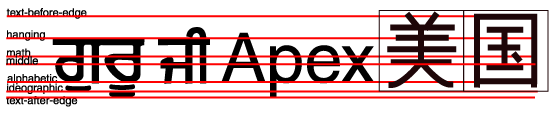
This figure shows samples of Gurmukhi (a hanging Indic script), Latin
and ideographic scripts together with most of the baselines defined
below. The thin line around the ideographic glyphs symbolizes the em
box in which these glyphs are centered. In this figure, the position
of the "text-before-edge" and "text-after-edge" baselines is computed
assuming that the "alphabetic" baseline is the dominant-baseline. The
"central" baseline has been omitted from the figure, but it lies
halfway between the "text-before-edge" and "text-after-edge"
baselines, just about where the "math" baseline is shown.
The baseline-identifiers below are used in this specification.
Some of these are determined by baseline-tables contained in a font as
described in
[font-model]
. Others are
computed from other font characteristics as described below.
Whether determined by the font or computed, a
derived baseline-table is constructed with positions for each of the
baselines below.
-
alphabetic
-
This identifies the baseline used by most alphabetic and syllabic
scripts. These include, but are not limited to, many Western, Southern
Indic, Southeast Asian (non-ideographic) scripts.
-
ideographic
-
This identifies the baseline used by ideographic scripts. For
historical reasons, this baseline is at the bottom of the ideographic
em box and not in the center of the ideographic em box. See the
"central" baseline. The ideographic scripts include Chinese, Japanese,
Korean, and Vietnamese Chu Nom.
-
hanging
-
This identifies the baseline used by certain Indic scripts. These
scripts include Devanagari, Gurmukhi and Bengali.
-
mathematical
-
This identifies the baseline used by mathematical symbols.
-
central
-
This identifies a computed baseline that is at the center of the em
box. This baseline lies halfway between the text-before-edge and
text-after-edge baselines.
NOTE:
For ideographic fonts, this baseline is
often used to align the glyphs; it is an alternative to the
ideographic baseline.
-
middle
-
This identifies a baseline that is offset from the alphabetic baseline
in the shift-direction by 1/2 the value of the x-height
font characteristic. The position of this baseline may be obtained
from the font data or, for fonts that have a font characteristic for
"x-height", it may be computed using 1/2 the "x-height". Lacking
either of these pieces of information, the position of this baseline
may be approximated by the "central" baseline.
-
text-before-edge
-
This identifies the before-edge of the em box. The position of this
baseline may be specified in the baseline-table or it may be
calculated.
NOTE:
The position of this baseline is normally around or at the
top of the ascenders, but it may not encompass all accents that can
appear above a glyph. For these fonts the value of the "ascent" font
characteristic is used. For ideographic fonts, the position of this
baseline is normally 1 em in the shift-direction from
the "ideographic" baseline. However, some ideographic fonts have a
reduced width in the inline-progression-direction to allow tighter
setting. When such a font, designed only for vertical writing-modes,
is used in a horizontal writing-mode, the "text-before-edge" baseline
may be less than 1 em from the text-after-edge.
-
text-after-edge
-
This identifies the after-edge of the em box. The position of this
baseline may be specified in the baseline-table or it may be
calculated.
NOTE:
For fonts with descenders, the position of this baseline is normally
around or at the bottom of the descenders. For these fonts the value
of the "descent" font characteristic is used. For ideographic fonts,
the position of this baseline is normally at the "ideographic"
baseline.
There are, in addition, two computed baselines that are only defined for line
areas. For each line-area, there is a dominant-baseline, a baseline-table and
a baseline-table font-size which are those of the nearest ancestor
formatting object that completely contains the whole line. The
"before-edge" and "after-edge" baselines are defined as follows.
-
before-edge
-
The offset of the "before-edge" baseline of the line from the
dominant-baseline of the line is determined by ignoring all
inline-areas whose alignment-baseline is either
"before-edge" or
"after-edge". For the "before-edge", extents are
measured from the dominant-baseline in the direction toward the top of
the reference-area. The top of the reference-area is defined by the
reference-area's reference-orientation. The
"before-edge" baseline offset is set to the maximum extent of the
"before-edges" of the allocation-rectangles of the remaining areas. If
all the inline-areas in a line-area are aligned either to the
"before-edge" or to the "after-edge", then use the offset of the
"text-before-edge" baseline of the line as the offset of the
"before-edge" baseline of the line.
-
after-edge
-
The offset of the "after-edge" baseline of the line from the
dominant-baseline of the line is determined by ignoring all
inline-areas whose alignment-baseline is after-edge. For the "after-edge", extents are
measured from the dominant-baseline in the direction toward the bottom
of the reference-area. The top of the reference-area is defined by the
reference-area's reference-orientation. The
"after-edge" baseline offset is set to the negative of the maximum of
(1) the maximum extent of the "after-edges" of the allocation-rectangles
of the remaining areas and (2) the maximum height of the
allocation-rectangles of the areas that are ignored minus the offset
of the "before-edge" baseline of the line.
NOTE:
If all the inline-areas in a line-area are aligned to the "after-edge"
then the specification for the "before-edge" will set the
"before-edge" baseline to coincide with the "text-before-baseline" of
the line. Then, case (2) above will determine
the offset to the "after-edge"
baseline. In this case the allocation-rectangle of one of the areas
will extend from the "before-edge" baseline to the "after-edge" baseline.
NOTE:
The above specifications for "before-edge" and "after-edge" have
the following three properties: (1) the allocation-rectangles of
all the areas are below the "before-edge", (2) the allocation-rectangles
of all the areas are above the "after-edge", and (3) the distance between
the "before-edge" and the "after-edge" cannot be decreased without
violating (1) or (2). The specified placement of the "before-edge"
and "after-edge" is not the only way that (1)-(3) can be satisfied,
but it is the only way they can be
satisfied with the smallest possible offset to the "before-edge".
Examples showing "before-edge" and "after-edge" alignment:
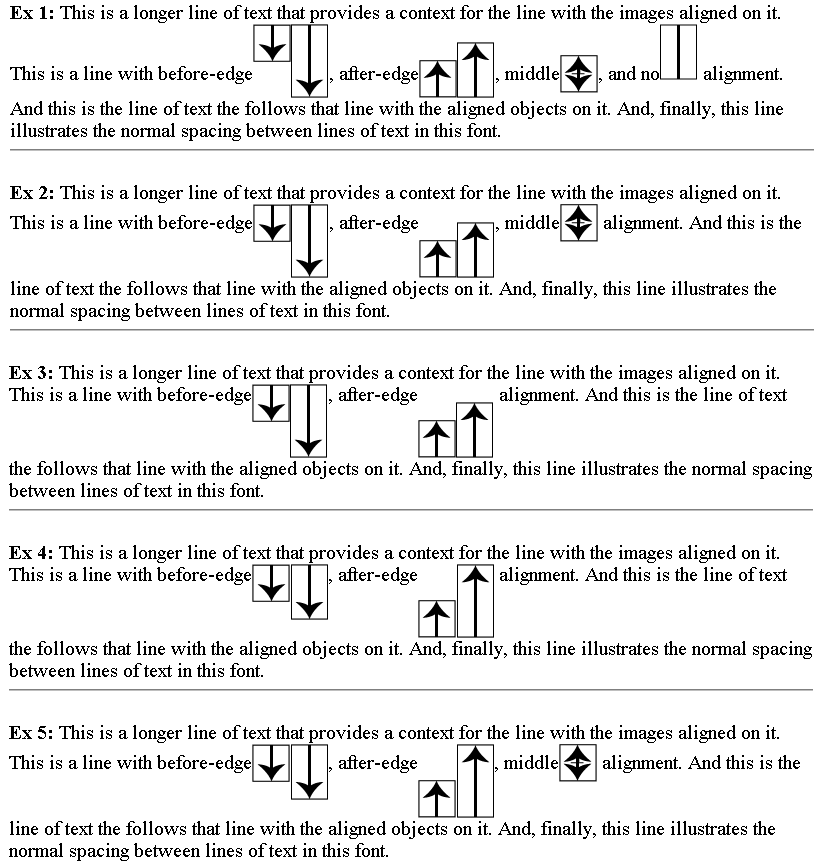
The rectangles with lines or arrows are images with an intrinsic size
as shown. The rectangles with no arrows represent images that receive
the default, dominant baseline, alignment. The alignment of the other
rectangles is at the furthest point from the arrow head (which is in
the middle when there are two arrowheads). Examples 1 and 2 show the
"before-edge" alignment is determined by the tallest non-"before-edge"
aligned objects: in example 1 this is the default aligned, arrowhead
free rectangular image and in example 2 this is the double headed
arrow rectangle. Examples 3 and 4 show defaulting to the
"text-before-edge" when all the areas have either "before-edge" or
"after-edge" alignment. In example 3, the images with "before-edge"
alignment has a taller member than do the "after-edge" aligned
images. In example 4, the tallest image is in the "after-edge" aligned
set. Example 5 is a repetition of example 2 with largest image being
an "after-edge" aligned image.
There are also four baselines that are defined only for horizontal writing-modes.
-
top
-
This baseline is the same as the "before-edge" baseline in a
horizontal writing-mode and is undefined in a vertical writing mode.
-
text-top
-
This baseline is the same as the "text-before-edge" baseline in a
horizontal writing-mode and is undefined in a vertical writing mode.
-
bottom
-
This baseline is the same as the "after-edge" baseline in a
horizontal writing-mode and is undefined in a vertical writing mode.
-
text-bottom
-
This baseline is the same as the "text-after-edge" baseline in a
horizontal writing-mode and is undefined in a vertical writing mode.
The alignment of a formatting object with respect to its parent is
determined by three things: the scaled-baseline-table of the parent
and the alignment-baseline and alignment-point of the formatting
object being aligned. Prior to alignment, the scaled-baseline-table of
the parent may be shifted. The property specifications
below provide the information necessary to align the parent and child
formatting objects.
There are four properties that control alignment of formatting objects
to the above set of baselines. These properties are all independent
and are designed so that typically only the specification of
one of the properties is needed to achieve a particular alignment goal.
The primary baseline alignment property is the
"dominant-baseline" property. This property has a compound
value with three components. The dominant-baseline-identifier
component is the default alignment-baseline to be used when
aligning two inline-areas. The baseline-table component specifies the
positions of the baselines in the font design space coordinates. (See
[font-model]
.) The baseline-table acts
something like a musical staff; it defines particular points along the
block-progression-direction to which glyphs and inline
formatting objects can be aligned. The baseline-table font-size component
provides a scaling factor for the baseline-table.
For convenience, the specification will sometimes refer to the
baseline identified by the dominant-baseline-identifier component of
the "dominant-baseline" property as the "dominant
baseline" (in an abuse of terminology).
A simple example of alignment is shown in the following figure. The
figure shows the presentation of two inline formatting objects, one
inside the other. These inline formatting objects make up the content
of a line in a block where the writing-mode is "lr-tb" and the
font is "Helvetica".
The structure of the example is as follows:
<fo:inline>Apex <fo:inline>Top</fo:inline></fo:inline>
Because no properties are specified, the initial values apply. Since a
horizontal writing-mode is in use, the dominant-baseline-identifier is
set to "alphabetic" and the baseline-table is taken from the
nominal-font for the block in which the line appears, which, in this case,
is Helvetica.
In the figure, the positions of the baselines relative
to the current font size are shown as red (staff) lines. These lines
are labeled with abbreviations of the names of the baselines (e.g.,
TBE for "text-before-edge"). The baseline identified by the
dominant-baseline-identifier (A) is shown in blue. There is a break in the
staff lines to separately show the inner inline formatting
object. This is not necessary for this example, but this distinction
will become important in subsequent examples.
The "alignment-baseline" property is the primary control on
the positioning of an inner formatting object with respect to its
parent. For all but fo:character, the initial value of the
"alignment-baseline" property is "baseline". This
aligns the dominant-baseline of the inner inline formatting object
with the dominant baseline of the outer inline formatting object. This
is shown by the short blue line that connects the two separated
staffs (A) in the figure.
The glyphs determined by the fo:characters that are in the content of
the two formatting objects are aligned based on the script to which
the glyph belongs. Since this example only has Latin glyphs, they are
aligned to the "alphabetic" baseline.
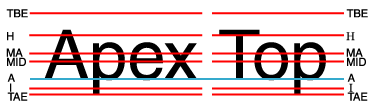
An inner inline formatting object containing Latin characters aligned
to an outer inline formatting object also containing Latin characters.
In the next figure, the content of the inner inline formatting object
is in Gurmukhi, the script of the Punjabi language. The Gurmukhi
syllables are read as, "guru". Rather than use Unicode values for
these characters, they are symbolized by placing the Latin
transliteration in italic type. The structure of the example becomes:
<fo:inline>Apex <fo:inline>guru</fo:inline></fo:inline>
The only change from the previous example is that the glyphs of the
Gurmukhi script are aligned to the "hanging" baseline
of the inner inline formatting object. The alignment of that
formatting object itself, with respect to the outer inline
formatting object, is unchanged.
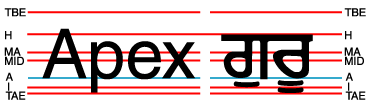
An inner inline formatting object containing Gurmukhi characters
aligned to an outer inline formatting object containing Latin
characters.
In the next figure, fragments of the text of the previous examples
make up the content of the outer inline formatting object.
The inner inline formatting object has a change of font-size, however.
The structure is:
<fo:inline>Apguru
  <fo:inline font-size='.75em'>
    Exji
  </fo:inline>
</fo:inline>
In this example, the alignment of the inner inline formatting object
itself does not change, nor does the alignment of the smaller glyphs
inside the inner formatting object. The Latin glyphs are still
aligned to the "alphabetic" baseline and the Gurmukhi glyphs,
which are pronounced "ji" are aligned to the
"hanging" baseline. Note also that just changing the
"font-size" property did not change the baseline-table
in effect in the inner inline formatting object.
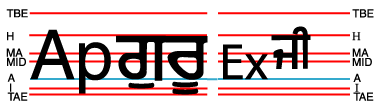
The inner inline formatting object has a reduced font-size.
The next figure is equivalent to the previous example with the
Gurmukhi character replaced by ideographic characters.
These are aligned to the "ideographic" baseline.
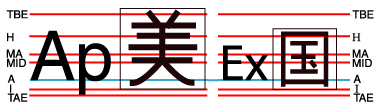
The previous figure re-done with ideographic glyphs instead of
Gurmukhi glyphs. The em boxes are shown for the ideograms
to clarify the alignment of these glyphs.
To change the scaling of the lines of the baseline table, it is
necessary to use the "dominant-baseline" property on the
inner inline formatting object. The value of "reset-size"
causes the baseline-table font-size to be reset from the font-size of
the formatting object on which the "dominant-baseline"
property appears. The next figure shows the effect of this, using the
structure:
<fo:inline>Apguru
  <fo:inline font-size='.75em'
             dominant-baseline='reset-size'>
     Exji
  </fo:inline>
</fo:inline>
The alignment of the inner inline formatting object, with respect to
the outer inline formatting object, is still
determined by aligning the dominant baselines. But, the baseline-table
of the inner inline formatting object has been rescaled to the
font-size of the inner inline formatting object. Hence the smaller
glyphs align with each other.
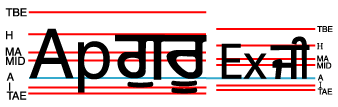
The baseline-table of the inner inline formatting object has been
re-sized to match the font-size of the inner inline formatting object.
But, what if it is more important that the small Gurmukhi glyphs align
with the large Gurmukhi glyphs than having the Latin glyphs align.
There are at least two ways to achieve this. The structure:
<fo:inline dominant-baseline='hanging'>Apguru
  <fo:inline font-size='.75em'
             dominant-baseline='reset-size'>
     Exji
  </fo:inline>
</fo:inline>
is illustrated in the next figure. The "hanging" baseline
becomes the dominant baseline and the initial value of the
"alignment-baseline" property causes the (newly) dominant
"hanging" baselines to be aligned as is shown by the
connection of the blue baselines.
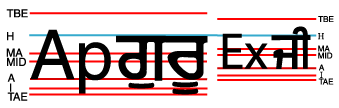
Changing the dominant baseline to the "hanging" baseline
causes the inner inline formatting object to be aligned on its
parent's "hanging" baseline.
It is also possible to achieve the effect of the above figure without
changing the dominant baseline. Instead it is sufficient to explicitly
specify that the inner inline formatting object is aligned on its
"hanging" baseline. This is done by:
<fo:inline>Apguru
  <fo:inline font-size='.75em'
             dominant-baseline='reset-size'
             alignment-baseline='hanging'>
     Exji
  </fo:inline>
</fo:inline>
The only change this approach would make in the above figure is to
color the "hanging" baseline red and keep the
"alphabetic" baseline as the (blue) dominant baseline. This
baseline in the inner inline formatting object would not (as it does
not in the above figure) align with the "alphabetic"
baseline in the outer inline formatting object.
The third baseline alignment property is the
"baseline-shift" property. Like the properties other
than the "dominant-baseline" property, this property does
not change the baseline-table or the baseline-table font-size. It does
shift the whole baseline table of the parent formatting object so that
when an inner inline formatting object is aligned to one of the
parents baselines, the position of the inner inline formatting object
is shifted. This is illustrated in the next figure. The structure
which creates this figure is:
<fo:inline>Ap
  <fo:inline baseline-shift='super'>1ji</fo:inline>
</fo:inline>
Because the whole set of baseline-table staff lines are shifted to the
position of the superscript baseline: it does not matter to which
baseline the glyphs in the superscript are aligned. The European
number "1" is aligned to the "alphabetic" baseline
and the Gurmukhi syllable "ji" is aligned to the
"hanging" baseline.
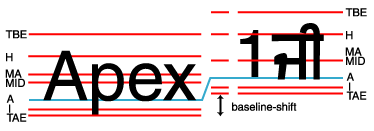
Using a "baseline-shift" for a superscript
(or a subscript).
It is more common for the font-size of the superscript text to be
smaller than the font-size of the text to which it is appended.
Consider:
<fo:inline>Ap
  <fo:inline font-size='.75em'
             baseline-shift='super'>
    1ji
  </fo:inline>
</fo:inline>
Because changing the font-size on a superscript (or subscript) is
common, this is the one case where changing the font-size does cause
the baseline-table font-size to be reset when the
"dominant-baseline" property has its initial value. After
the rescaling, the default alignment to the dominant baseline
positions the inline formatting object for the superscript to the
dominant baseline position in the shifted baseline-table of the parent
formatting object.
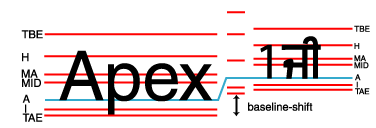
Reducing the font-size of the superscript automatically resets the
baseline-table size so that mixed languages in the superscript stay
mutually aligned.
The fourth alignment property is the "alignment-adjust"
property. This property is primarily used for objects, such as some
graphics, that do not belong to a particular script and do not have a
predefined alignment point. The "alignment-adjust"
property allows the author to assign where, on the start-edge
of the object, the
alignment point for that object lies.
alignment-adjust[top]
"alignment-adjust"
XSL Definition:
0prop-summary
lefttop| 11lefttopValue: | 11lefttopauto | baseline | before-edge
| text-before-edge | middle | central | after-edge
| text-after-edge | ideographic | alphabetic | hanging | mathematical
| <percentage> | <length>
| inherit |
lefttop| 11lefttopInitial: | 11lefttopauto |
lefttop| 11lefttopApplies to: | 11lefttopall inline formatting objects |
lefttop| 11lefttopInherited: | 11lefttopno |
lefttop| 11lefttopPercentages: | 11lefttopsee prose |
lefttop| 11lefttopMedia: | 11lefttopvisual |
The "alignment-adjust" property allows more precise alignment of
areas generated by formatting objects,
in particular for formatting objects,
such as graphics, that do not have a baseline-table
or lack the desired baseline in their baseline-table. With the
"alignment-adjust" property, the position of the baseline identified
by the "alignment-baseline" can be explicitly determined.
Values for the property have the following meaning:
-
auto
-
For a glyph, the alignment-point is the intersection of the
start-edge of the allocation-rectangle of the glyph-area and the
block-progression-direction position of the alignment-point from the
font as specified in
[font-model]
.
For other inline-areas, the alignment-point is at the intersection of
the start-edge of the allocation-rectangle and the baseline identified by
the "alignment-baseline" property if this baseline exists in the
baseline-table for the dominant-baseline for the inline-area. If the
baseline-identifier does not exist in the baseline-table for the glyph
or other inline-area, then the User Agent may either use heuristics to
determine where that missing baseline would be or may use the
dominant-baseline as a fallback. For areas generated by a
fo:external-graphic, or fo:instream-foreign-object, the alignment
point is at the intersection of the start-edge and after-edge of the
allocation-rectangle of the area.
-
baseline
-
The alignment-point is at the intersection of
the start-edge of the allocation-rectangle and the
dominant-baseline of the area.
-
before-edge
-
The alignment-point is at the intersection of the start-edge of the allocation-rectangle and the "before-edge"
baseline of the area.
-
text-before-edge
-
The alignment-point is at the intersection of the start-edge of the allocation-rectangle and the
"text-before-edge" baseline of the area.
-
central
-
The alignment-point is at the intersection of the start-edge of the allocation-rectangle and the
"central" baseline of the area.
-
middle
-
The alignment-point is at the intersection of the start-edge of the allocation-rectangle and the
"middle" baseline of the area.
-
after-edge
-
The alignment-point is at the intersection of the start-edge of the allocation-rectangle and the "after-edge" baseline of
the area.
-
text-after-edge
-
The alignment-point is at the intersection of the start-edge of the allocation-rectangle and the
"text-after-edge" baseline of the area.
-
ideographic
-
The alignment-point is at the intersection of the start-edge of the allocation-rectangle and the
"ideographic" baseline of the area.
-
alphabetic
-
The alignment-point is at the intersection of the start-edge of the allocation-rectangle and the
"alphabetic" baseline of the area.
-
hanging
-
The alignment-point is at the intersection of the start-edge of the allocation-rectangle and the
"hanging" baseline of the area.
-
mathematical
-
The alignment-point is at the intersection of the start-edge of the allocation-rectangle and the
"mathematical" baseline of the area.
-
top
-
The alignment-point is at the intersection of the start-edge
of the allocation-rectangle and the "top" baseline of the area if the
writing-mode is horizontal. Otherwise, the dominant-baseline is used.
-
bottom
-
The alignment-point is at the intersection of the start-edge of the
allocation-rectangle and the "bottom" baseline of the area if the
writing-mode is horizontal. Otherwise, the dominant-baseline is used.
-
text-top
-
The alignment-point is at the intersection of the start-edge of the
allocation-rectangle and the "text-top" baseline of the area if the
writing-mode is horizontal. Otherwise, the dominant-baseline is used.
-
text-bottom
-
The alignment-point is at the intersection of the start-edge
of the allocation-rectangle and the "text-bottom" baseline of the area
if the writing-mode is horizontal. Otherwise, the dominant-baseline is
used.
-
<percentage>
-
The computed value of the property is this percentage multiplied by
the area's computed "height" if the area is generated by an
fo:external-graphic or fo:instream-foreign-object,
the "font-size" if the area was generated by an fo:character, and the "line-height"
otherwise. The alignment-point is on the start-edge of the
allocation-rectangle of the area
being aligned. Its position along the start-edge relative to the
intersection of the dominant-baseline and the start-edge is offset by
the computed value. The offset is opposite to the shift-direction if
that value is positive and in the shift-direction if that value is
negative value). A value of "0%" makes the dominant-baseline the
alignment point.
-
<length>
-
The alignment-point is on the start-edge of the
allocation-rectangle of the area being
aligned. Its position along the start-edge relative to the
intersection of the dominant-baseline and the start-edge is offset by
<length> value. The offset is opposite to the shift-direction if
that value is positive and in the shift-direction if that value is
negative. A value of "0cm" makes the dominant-baseline the
alignment point.
Implementations must support at least one of the "alignment-adjust"
values defined in this Recommendation.
alignment-baseline[top]
"alignment-baseline"
XSL Definition:
0prop-summary
lefttop| 11lefttopValue: | 11lefttopauto | baseline | before-edge
| text-before-edge | middle | central | after-edge
| text-after-edge | ideographic | alphabetic | hanging | mathematical
| inherit |
lefttop| 11lefttopInitial: | 11lefttopauto |
lefttop| 11lefttopApplies to: | 11lefttopall inline formatting objects |
lefttop| 11lefttopInherited: | 11lefttopno |
lefttop| 11lefttopPercentages: | 11lefttopN/A |
lefttop| 11lefttopMedia: | 11lefttopvisual |
This property specifies how an object is aligned with respect to
its parent. That is, to which of the parent's baselines the
alignment-point of this object is aligned.
The alignment-adjust property specifies how the alignment point
is determined. It defaults to the baseline with the same name
as the computed value of the alignment-baseline property.
That is, the
position of "ideographic" alignment-point in the
block-progression-direction is the position of the
"ideographic" baseline in the baseline-table of the object being
aligned.
Values have the following meanings:
-
auto
-
The computed
value depends on the kind of object on which it is being used.
For fo:character, the value
is the dominant-baseline of the script to which the character belongs.
If the value of the "script" property on the parent formatting object is other than "auto" then use the baseline for that script; otherwise, use the dominant-baseline of the parent.
For all other objects, the value is computed as for the "baseline" value.
-
baseline
-
The alignment-point of the object being aligned is aligned with the
dominant-baseline of the parent area.
-
before-edge
-
The alignment-point of the object being aligned is aligned with the "before-edge"
baseline of the parent area.
-
text-before-edge
-
The alignment-point of the object being aligned is aligned with the
"text-before-edge" baseline of the parent area.
-
central
-
The alignment-point of the object being aligned is aligned with the
"central" baseline of the parent area.
-
middle
-
The alignment-point of the object being aligned is aligned with the
"middle" baseline of the parent area.
-
after-edge
-
The alignment-point of the object being aligned is aligned with the "after-edge" baseline of
the parent area.
-
text-after-edge
-
The alignment-point of the object being aligned is aligned with the
"text-after-edge" baseline of the parent area.
-
ideographic
-
The alignment-point of the object being aligned is aligned with the
"ideographic" baseline of the parent area.
-
alphabetic
-
The alignment-point of the object being aligned is aligned with the
"alphabetic" baseline of the parent area.
-
hanging
-
The alignment-point of the object being aligned is aligned with the
"hanging" baseline of the parent area.
-
mathematical
-
The alignment-point of the object being aligned is aligned with the
"mathematical" baseline of the parent area.
-
top
-
The alignment-point of the object being aligned is aligned
with the "top" baseline of the parent area if the writing-mode is
horizontal. Otherwise, the dominant-baseline is used.
-
bottom
-
The alignment-point of the object being aligned is aligned
with the "bottom" baseline of the parent area if the writing-mode is
horizontal. Otherwise, the dominant-baseline is used.
-
text-top
-
The alignment-point of the object being aligned is aligned
with the "text-top" baseline of the parent area if the writing-mode is
horizontal. Otherwise, the dominant-baseline is used.
-
text-bottom
-
The alignment-point of the object being aligned is aligned
with the "text-bottom" baseline of the parent area if the writing-mode is
horizontal. Otherwise, the dominant-baseline is used.
Implementations must support at least one of the "alignment-baseline"
values defined in this Recommendation.
baseline-shift[top]
"baseline-shift"
XSL Definition:
0prop-summary
lefttop| 11lefttopValue: | 11lefttopbaseline | sub | super | <percentage> | <length>
| inherit |
lefttop| 11lefttopInitial: | 11lefttopbaseline |
lefttop| 11lefttopApplies to: | 11lefttopall inline formatting objects |
lefttop| 11lefttopInherited: | 11lefttopno |
lefttop| 11lefttopPercentages: | 11lefttoprefers to the "line-height" of the parent area |
lefttop| 11lefttopMedia: | 11lefttopvisual |
The "baseline-shift" property allows repositioning of the
dominant-baseline relative to the dominant-baseline of the parent
area. The shifted object might be a subscript or superscript. Within the
shifted object, the whole baseline-table is offset; not just a single
baseline. The amount of the shift is determined from information from
the parent area, the subscript or superscript offset from the
nominal-font of the parent area, percent of the
"line-height" of the parent area or an absolute value.
When the value of "baseline-shift"
is other than
"0", then the baseline-table font-size component of the
"dominant-baseline" property is re-computed to use the "font-size"
applicable to the formatting object on which the non-zero "baseline-shift"
property is specified.
Values for the property have the following meaning:
-
baseline
-
There is no baseline shift; the dominant-baseline remains in its original position.
-
sub
-
The dominant-baseline is shifted to the default position for
subscripts. The offset to this position
is determined using the font data for the nominal font. Because in most
fonts the subscript position is normally given relative to the
"alphabetic" baseline, the User Agent may compute the effective position for subscripts
for superscripts when some other baseline is dominant. The suggested
computation is to subtract the difference between the position of the
dominant baseline and the position of the "alphabetic" baseline from the
position of the subscript. The resulting offset is determined by
multiplying the effective subscript position by the dominant
baseline-table font-size. If there is no applicable font data the
User Agent may use heuristics to determine the offset.
-
super
-
The dominant-baseline is shifted to the default position for
superscripts. The offset to this position
is determined using the font data for the nominal font. Because in most
fonts the superscript position is normally given relative to the
"alphabetic" baseline, the User Agent may compute the effective position
for superscripts when some other baseline is dominant. The suggested
computation is to subtract the difference between the position of the
dominant baseline and the position of the "alphabetic" baseline from the
position of the superscript. The resulting offset is determined by
multiplying the effective superscript position by the dominant
baseline-table font-size. If there is no applicable font data the
User Agent may use heuristics to determine the offset.
-
<percentage>
-
The computed value of the property is this percentage multiplied by
the computed "line-height" of the parent area. The dominant-baseline
is shifted in the shift-direction (positive value) or opposite to the
shift-direction (negative value) of the parent area by the computed
value. A value of "0%" is equivalent to "baseline".
-
<length>
-
The dominant-baseline is shifted in the shift-direction (positive
value) or opposite to the shift-direction (negative value) of the
parent area by the <length> value. A value of "0cm" is equivalent
to "baseline".
NOTE:
Although it may seem that "baseline-shift" and "alignment-adjust"
properties are doing the same thing, there is an important although,
perhaps, subtle difference. For "alignment-adjust" the percentage
values refer to the "line-height" of the area being aligned. For
"baseline-shift" the percentage values refer to the "line-height" of
the parent. Similarly, it is the "sub" and "super" offsets of the
parent that are used to align the shifted baseline rather than the
"sub" or "super" offsets of the areas being positioned. To ensure a
consistent subscript or superscript position, it makes more sense to use
the parent as the reference rather than the subscript formatting object which
may have a changed "line-height" due to "font-size" changes in the
subscript or superscript formatting object.
Using the "alignment-adjust" property is more suitable for positioning
objects, such as graphics, that have no internal textual
structure. Using the "baseline-shift" property is intended for subscripts
and superscripts where the positioned object may itself be a textual
object. The baseline-shift provides a way to define a specific
baseline offset other than the named offsets that are defined relative
to the dominant-baseline. In addition, having "baseline-shift" makes
it easier for tool to generate the relevant properties; many
formatting programs already have a notion of baseline
shift.
display-align[top]
"display-align"
XSL Definition:
0prop-summary
lefttop| 11lefttopValue: | 11lefttopauto | before | center | after
| inherit |
lefttop| 11lefttopInitial: | 11lefttopauto |
lefttop| 11lefttopApplies to: | 11lefttopfo:table-cell, fo:region-body, fo:region-before, fo:region-after, fo:region-start, fo:region-end,
fo:block-container, fo:inline-container, fo:external-graphic,
fo:instream-foreign-object
|
lefttop| 11lefttopInherited: | 11lefttopyes |
lefttop| 11lefttopPercentages: | 11lefttopN/A |
lefttop| 11lefttopMedia: | 11lefttopvisual |
This property specifies the alignment, in the block-progression-direction,
of the areas that are the children of a reference-area.
Values for the property have the following meaning:
-
auto
-
If the "relative-align" property applies to this formatting object
the "relative-align" property is used. If not, this value is treated
as if "before" had been specified.
-
before
-
The before-edge of the allocation-rectangle of the first
child area is placed coincident with the before-edge of the
content-rectangle of the reference-area.
-
center
-
The child areas are placed such that the
distance
between the before-edge of the allocation-rectangle of the
first child area and the before-edge of the content-rectangle
of the reference-area
is the same as the distance
between the after-edge of the allocation-rectangle of the
last child area and the after-edge of the content-rectangle
of the reference-area.
-
after
-
The after-edge of the allocation-rectangle of the last
child area is placed coincident with the after-edge of the
content-rectangle of the reference-area.
dominant-baseline[top]
"dominant-baseline"
XSL Definition:
0prop-summary
lefttop| 11lefttopValue: | 11lefttopauto | use-script | no-change | reset-size
| ideographic | alphabetic | hanging | mathematical
| central | middle | text-after-edge | text-before-edge
| inherit |
lefttop| 11lefttopInitial: | 11lefttopauto |
lefttop| 11lefttopApplies to: | 11lefttopall inline formatting objects |
lefttop| 11lefttopInherited: | 11lefttopno |
lefttop| 11lefttopPercentages: | 11lefttopN/A |
lefttop| 11lefttopMedia: | 11lefttopvisual |
The "dominant-baseline" property is used to determine or
re-determine a scaled-baseline-table. A scaled-baseline-table is a
compound value with three components: a baseline-identifier for the
dominant-baseline, a derived baseline-table
and a baseline-table font-size.
Some values of the property re-determine all three values; other only
re-establish the baseline-table font-size. When the initial value,
"auto", would give an undesired result, this property can be used to
explicitly set the desired scaled-baseline-table.
NOTE:
The derived baseline-table is constructed using a baseline-table
in the font that corresponds to the computed value of the "writing-mode".
Values for the property have the following meaning:
-
auto
-
If this property occurs on a block-level formatting object, then
the computed value depends on the value of the "script"
property. There are two cases. If the value of the "script" property
is "auto", then, if the "writing-mode" is horizontal, then the
baseline-identifier for the dominant baseline is set to be "alphabetic",
else if the "writing-mode" is vertical, then the baseline-identifier
for the dominant baseline is set to be "central".
On the other hand, if the value of the "script"
property is anything other than "auto", then the value of the "script"
property is used to select the baseline-identifier for the dominant baseline.
The mapping from script to baseline-identifier is taken from the
nominal font. The derived baseline-table is constructed using the
baseline-table in the nominal font that corresponds to the
baseline-identifier for the dominant baseline.
The baseline-table font-size is changed to the value of the
"font-size" property on this formatting object.
Otherwise, if this property is not on a block-level formatting object,
then the baseline-identifier for the dominant baseline, the derived
baseline-table, and baseline-table font-size remain
the same as those of the parent formatting object. If the computed
"baseline-shift" value actually shifts the baseline, then the
baseline-table font-size is set to the value of the
"font-size" property on the formatting object on which the
"dominant-baseline" property occurs, otherwise the baseline-table
font-size remains the same as that of the parent formatting object. If
there is no parent formatting object, the derived baseline-table
is constructed as above for block-level formatting-objects.
-
use-script
-
The "script" property is used to select the baseline-identifier for
the dominant baseline.
The mapping from script to baseline-identifier is taken from the nominal font.
The derived baseline-table is constructed using the
baseline-table in the nominal font that corresponds to the
baseline-identifier for the dominant baseline.
The baseline-table font-size is changed to the value of the "font-size"
property on this formatting object.
-
no-change
-
The dominant-baseline, the baseline-table, and the baseline-table
font-size remain the same as that of the parent formatting object.
-
reset-size
-
The dominant-baseline and the baseline-table remain the same, but the
baseline-table font-size is changed to the value of the "font-size"
property on this formatting object. This re-scales the baseline-table for the
current "font-size".
-
ideographic
-
The baseline-identifier for the dominant-baseline is set
to be "ideographic".
The derived baseline-table is constructed using the "ideographic"
baseline-table in the nominal font.
The baseline-table font-size is changed to the value of the "font-size"
property on this formatting object.
-
alphabetic
-
The baseline-identifier for the dominant-baseline is set
to be "alphabetic".
The derived baseline-table is constructed using the "alphabetic"
baseline-table in the nominal font.
The baseline-table font-size is changed to the value of the "font-size"
property on this formatting object.
-
hanging
-
The baseline-identifier for the dominant-baseline is set
to be "hanging".
The derived baseline-table is constructed using the "hanging"
baseline-table in the nominal font.
The baseline-table font-size is changed to the value of the "font-size"
property on this formatting object.
-
mathematical
-
The baseline-identifier for the dominant-baseline is set
to be "mathematical".
The derived baseline-table is constructed using the "mathematical"
baseline-table in the nominal font.
The baseline-table font-size is changed to the value of the "font-size"
property on this formatting object.
-
central
-
The baseline-identifier for the
dominant-baseline is set to be "central".
The derived baseline-table is constructed from the defined baselines
in a baseline-table in the nominal font. That font baseline-table is
chosen using the following priority order of baseline-table names:
"ideographic", "alphabetic", "hanging", "mathematical".
The baseline-table font-size is changed to the value of the "font-size"
property on this formatting object.
-
middle
-
The baseline-identifier for the dominant-baseline is set
to be "middle".
The derived baseline-table is constructed from the defined baselines
in a baseline-table in the nominal font. That font baseline-table is
chosen using the following priority order of baseline-table names:
"alphabetic", "ideographic", "hanging", "mathematical".
The baseline-table font-size is changed to the value of the "font-size"
property on this formatting object.
-
text-after-edge
-
The baseline-identifier for the dominant-baseline is set
to be "text-after-edge".
The derived baseline-table is constructed from the
defined baselines in a baseline-table in the nominal font. The choice of
which font baseline-table to use from the baseline-tables in the nominal
font is implementation defined. The baseline-table font-size is changed
to the value of the "font-size" property on this formatting object.
NOTE:
Using the following priority order of baseline-table names:
"alphabetic", "ideographic", "hanging", "mathematical" is probably a
reasonable strategy for determining which font baseline-table to use.
-
text-before-edge
-
The baseline-identifier for the dominant-baseline is set
to be "text-before-edge".
The derived baseline-table is constructed from the
defined baselines in a baseline-table in the nominal font. The choice of
which baseline-table to use from the baseline-tables in the nominal
font is implementation defined.
The baseline-table font-size is changed to the
value of the "font-size" property on this formatting object.
NOTE:
Using the following priority order of baseline-table names:
'alphabetic', 'ideographic', 'hanging', 'mathematical' is probably a
reasonable strategy for determining which font baseline-table to use.
If there is no baseline-table in the nominal font or if the
baseline-table lacks an entry for the desired baseline, then the User
Agent may use heuristics to determine the position of the desired
baseline.
Implementations must support at least one of the "dominant-baseline"
values defined in this Recommendation.
relative-align[top]
"relative-align"
XSL Definition:
0prop-summary
lefttop| 11lefttopValue: | 11lefttopbefore | baseline
| inherit |
lefttop| 11lefttopInitial: | 11lefttopbefore |
lefttop| 11lefttopApplies to: | 11lefttopfo:list-item, fo:table-cell |
lefttop| 11lefttopInherited: | 11lefttopyes |
lefttop| 11lefttopPercentages: | 11lefttopN/A |
lefttop| 11lefttopMedia: | 11lefttopvisual |
This property specifies the alignment, in the block-progression-direction,
between two or more areas.
If the "display-align" property applies to this formatting object and
has a value other than "auto" this property is ignored.
Values for the property have the following meaning:
-
before
-
For an fo:table-cell: for each row, the first child area of
all the cells that start in the row and that have this value is placed
such that the before-edge of the content-rectangle
is placed at
the same distance from the row grid. In addition, at least, one
of these first child areas of the cells
has to be placed with the before-edge of its allocation-rectangle
coincident with the before-edge of the content-rectangle
of the table-cell.
For an fo:list-item the before-edge of the first area descendant
generated by the fo:list-item-label is placed coincident with the
before-edge of the area generated by the fo:list-item.
Similarly the before-edge of the first
area descendant generated by the fo:list-item-body is placed coincident
with the before-edge of the area generated by the fo:list-item.
-
baseline
-
For an fo:table-cell: for each row, the first child area of
all the cells that start in the row and that have this value is placed
such that the dominant-baseline, as specified on the fo:table-row,
of the first line is placed at
the same distance from the row grid. In addition, at least, one
of these first child areas of the cells
has to be placed with the before-edge of its allocation-rectangle
coincident with the before-edge of the content-rectangle
of the table-cell.
NOTE:
That is, for all applicable cells the baseline of all the first
lines are all aligned and placed the minimum distance down in the
block-progression-direction. It should be noted that the start-edges
of the content-rectangles of the cells need not align.
For an fo:list-item the distance between the baseline of
the first line-area of the first area descendant generated by the
fo:list-item-label is the same as the distance between
the baseline of the
first line-area of the first area descendant generated by the
fo:list-item-body. In addition, at least, one of these first
area descendants has to be placed such that the before-edge of its
allocation-rectangle is coincident with the before-edge of the
content-rectangle of the list-item.
|
