
Table of contentsAppendices |
4.2 Rectangular AreasRectangular AreasArea Types[top]Area TypesThere are two types of areas: block-areas and inline-areas. These differ according to how they are typically stacked by the formatter. An area can have block-area children or inline-area children as determined by the generating formatting object, but a given area's children must all be of one type. Although block-areas and inline-areas are typically stacked, some areas can be explicitly positioned. A line-area is a special kind of block-area whose children are all inline-areas. A glyph-area is a special kind of inline-area which has no child areas, and has a single glyph image as its content. Typical examples of areas are: a paragraph rendered by using an fo:block formatting object, which generates block-areas, and a character rendered by using an fo:character formatting object, which generates an inline-area (in fact, a glyph-area). Common Traits[top]Common TraitsAssociated with any area are two directions, which are derived from the generating formatting object's writing-mode and reference-orientation properties: the block-progression-direction is the direction for stacking block-area descendants of the area, and the inline-progression-direction is the direction for stacking inline-area descendants of the area. Another trait, the shift-direction, is present on inline-areas and refers to the direction in which baseline shifts are applied. Also the glyph-orientation defines the orientation of glyph-images in the rendered result. If the reference-orientation for an area is 0, then the top, bottom, left, and right edges of the content are parallel to those of the area's parent and consistent with them. Otherwise the edges are rotated from those of the area's parent as described in [reference-orientation] . The inline-progression-direction and block-progression-direction are determined by the location of these edges as described in [writing-mode] . The Boolean trait is-reference-area determines
whether or not an area establishes a coordinate system for
specifying indents. An area for which this trait is The Boolean trait is-viewport-area determines
whether or not an area establishes an opening through which its
descendant areas can be viewed, and can be used to
present clipped or scrolled material; for example, in printing
applications where bleed and trim is desired.
An area for which this trait is A common construct is a viewport/reference pair. This is a viewport-area V and a block-area reference-area R, where R is the sole child of V and where the start-edge and end-edge of the content-rectangle of R are parallel to the start-edge and end-edge of the content-rectangle of V. Each area has the traits top-position, bottom-position,
left-position, and right-position which represent the distance
from the edges of its content-rectangle to the like-named edges of the
nearest ancestor reference-area (or the page-viewport-area
in the
case of areas generated by descendants of formatting objects
whose absolute-position is The block-progression-dimension and inline-progression-dimension of an area represent the extent of the content-rectangle of that area in each of the two relative dimensions. Other traits include:
Unless otherwise specified, the traits of a formatting object are present on each of its generated areas, and with the same value. (However, see sections [area-linebuild] and [rend-border] .) Geometric Definitions[top]Geometric DefinitionsAs described above, the content-rectangle is the rectangle bounding the inside of the padding and is used to describe the constraints on the positions of descendant areas. It is possible that marks from descendant glyphs or other areas may appear outside the content-rectangle. Related to this is the allocation-rectangle of an area, which is used to describe the constraints on the position of the area within its parent area. For an inline-area this is either the normal-allocation-rectangle or the large-allocation-rectangle. The normal-allocation-rectangle extends to the content-rectangle in the block-progression-direction and to the border-rectangle in the inline-progression-direction. The large-allocation-rectangle is the border-rectangle. Unless otherwise specified, the allocation-rectangle for an area is the normal-allocation-rectangle. 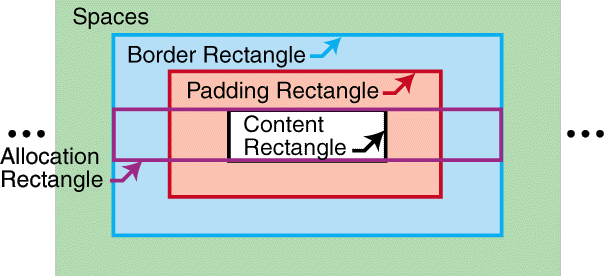
Normal-allocation-rectangle of an inline-area 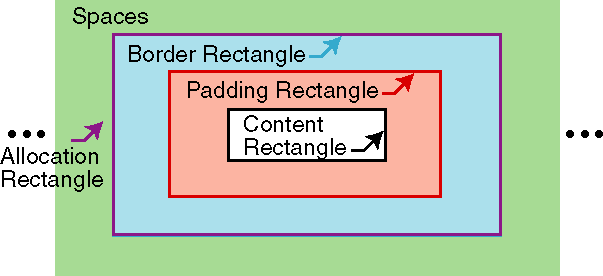
Large-allocation-rectangle of an inline-area For a block-area, the allocation-rectangle extends to the border-rectangle in the block-progression-direction and outside the content-rectangle in the inline-progression-direction by an amount equal to the end-indent, and in the opposite direction by an amount equal to the start-indent. NOTE: 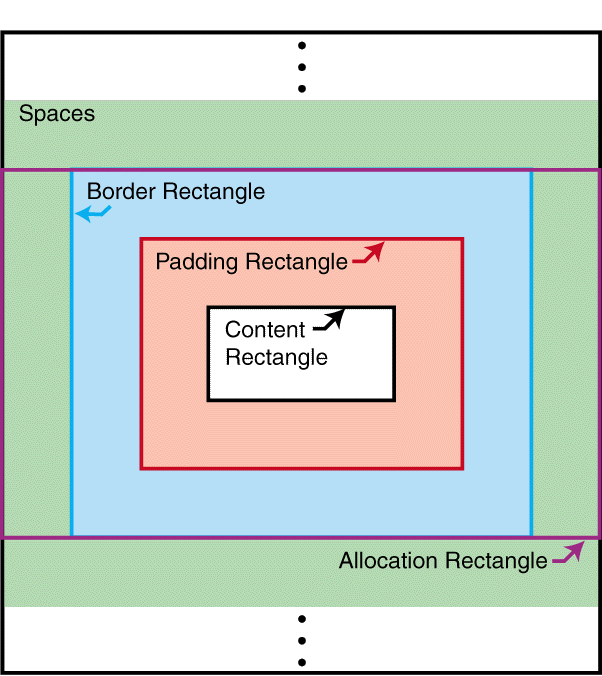
Allocation- and content-rectangles of a block-area The edges of a rectangle are designated as follows:
For purposes of this definition, the content-rectangle of an area uses the inline-progression-direction and block-progression-direction of that area; but the border-rectangle, padding-rectangle, and allocation-rectangle use the directions of its parent area. Thus the edges designated for the content-rectangle may not correspond to the same-named edges on the padding-, border-, and allocation-rectangles. This is important in the case of nested block-areas with different writing-modes. The following diagram shows the correspondence between the various edge names for a mixed writing-mode example: 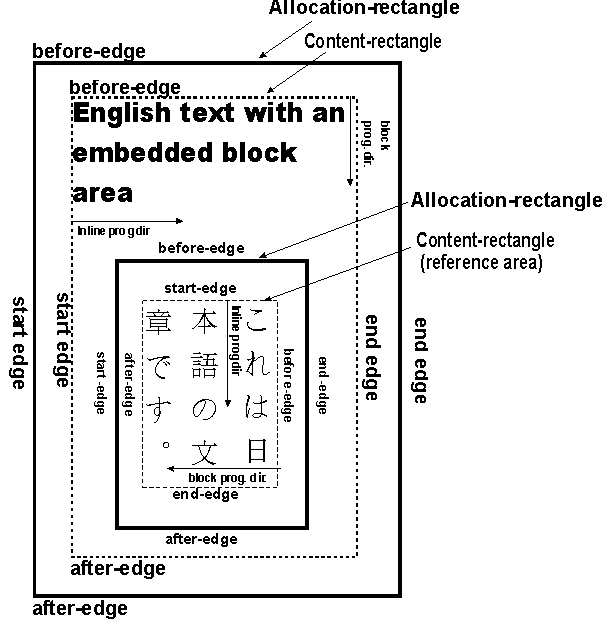
Each inline-area has an alignment-point determined by the formatter, on the start-edge of its allocation-rectangle; for a glyph-area, this is a point on the start-edge of the glyph on its alignment baseline (see below). This is script-dependent and does not necessarily correspond to the (0,0) coordinate point used for the data describing the glyph shape. Tree Ordering[top]Tree OrderingIn the area tree, the set of areas with a given parent is ordered. The terms initial, final, preceding, and following refer to this ordering. In any ordered tree, this sibling order extends to an ordering of the entire tree in at least two ways.
"Preceding" and "following", when applied to non-siblings, will depend on the extension order used, which must be specified. However, in either of these given orders, the leaves of the tree (nodes without children) are unambiguously ordered. Stacking Constraints[top]Stacking ConstraintsThis section defines the notion of block-stacking constraints and inline-stacking constraints involving areas. These are defined as ordered relations, i.e., if A and B have a stacking constraint it does not necessarily mean that B and A have a stacking constraint. These definitions are recursive in nature and some cases may depend upon simpler cases of the same definition. This is not circularity but rather a consequence of recursion. The intention of the definitions is to identify areas at any level of the tree which have only space between them. The area-class trait is an enumerated value which is
Block-stacking constraints If P is a block-area, then there is a fence preceding P if P is a reference-area or if the border-before-width or padding-before-width of P are non-zero. Similarly, there is a fence following P if P is a reference-area or if the border-after-width or padding-after-width of P are non-zero. If A and B are stackable areas, and S is a sequence of space-specifiers (see [spacecond] ), it is defined that A and B have block-stacking constraint S if any of the following conditions holds:
NOTE: 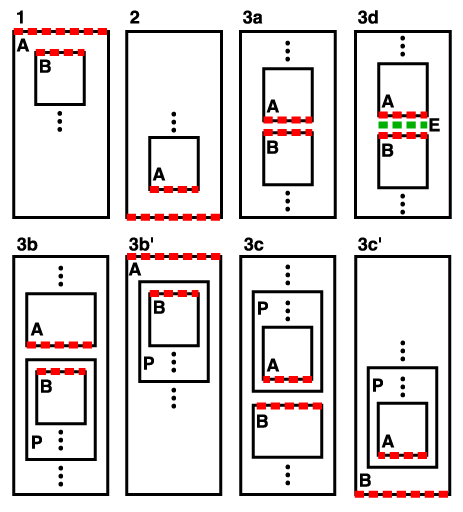
Adjacent Edges with Block-stacking When A and B have a block-stacking constraint, the adjacent edges of A and B are an ordered pair recursively defined as:
Example. In this diagram each node represents a block-area. Assume that all padding and border widths are zero, and none of the areas are reference-areas. Then P and A have a block-stacking constraint, as do A and B, A and C, B and C, C and D, D and B, B and E, D and E, and E and P; these are the only pairs in the diagram having block-stacking constraints. If B had non-zero padding-after, then D and E would not have any block-stacking constraint (though B and E would continue to have a block-stacking constraint). 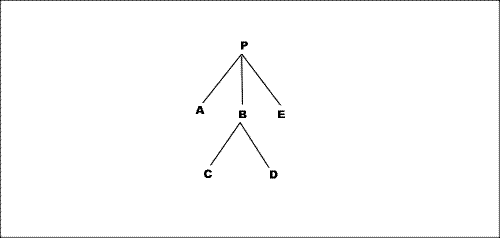
Block-stacking constraint example Inline-stacking constraints. This section will recursively define the inline-stacking constraints between two areas (either two inline-areas or one inline-area and one line-area), together with the notion of fence preceding and fence following; these definitions are interwoven with one another. This parallels the definition for block-stacking constraints, but with the additional complication that we may have a stacking constraint between inline-areas which are stacked in opposite inline-progression-directions. (This is not an issue for block-stacking constraints because a block-area which is not a reference-area may not have a block-progression-direction different from that of its parent.) If P and Q have an inline-stacking constraint, then P has a fence preceding Q if P is a reference-area or has non-zero border-width or padding-width at the first adjacent edge of P and Q. Similarly, Q has a fence following P if Q is a reference-area or has non-zero border-width or padding-width at the second adjacent edge of P and Q. If A and B are normal areas, and S is a sequence of space-specifiers, it is defined that A and B have inline-stacking constraint S if any of the following conditions holds:
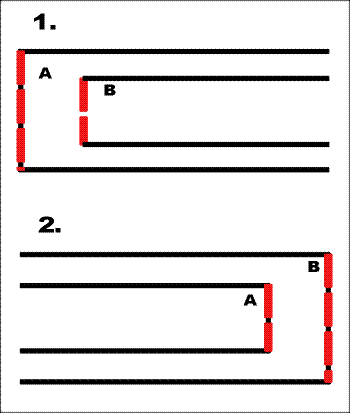
Adjacent Edges with Inline-stacking 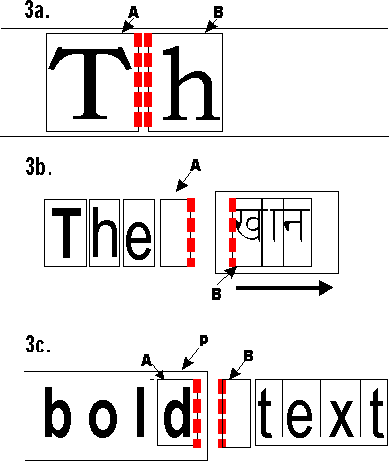
Adjacent Edges with Inline-stacking, continued 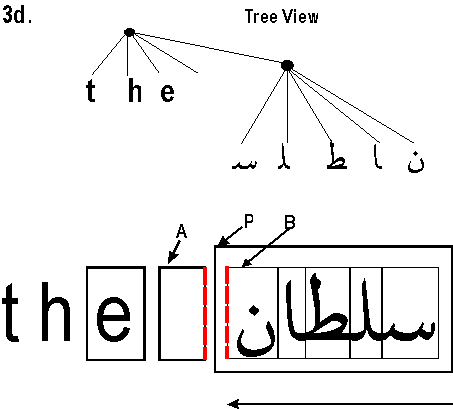
Mixed English and Arabic 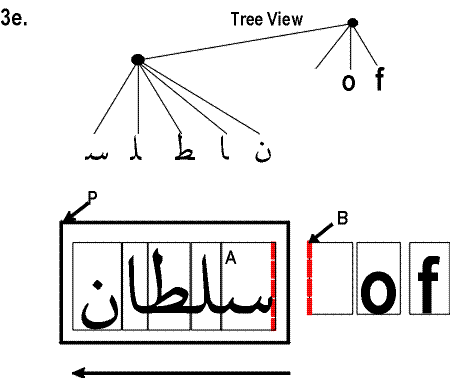
Mixed English and Arabic When A and B have an inline-stacking constraint, the adjacent edges of A and B are an ordered pair defined as:
Two areas are adjacent if they have a block-stacking constraint or an inline-stacking constraint. It follows from the definitions that areas of the same type (inline or block) can be adjacent only if all their non-common ancestors are also of the same type (up to but not including their nearest common ancestor). Thus, for example, two inline-areas which reside in different line-areas are never adjacent. An area A begins an area P if A is a descendant of P and P and A have either a block-stacking constraint or an inline-stacking constraint. In this case the second of the adjacent edges of P and A is defined to be a leading edge in P. A space-specifier which applies to the leading edge is also defined to begin P. Similarly, An area A ends an area P if A is a descendant of P and A and P have either a block-stacking constraint or an inline-stacking constraint. In this case the first of the adjacent edges of A and P is defined to be a trailing edge in P. A space-specifier which applies to the trailing edge is also defined to end P. Font Baseline Tables[top]Font Baseline TablesEach script has its preferred "baseline" for aligning glyphs from that script. Western scripts typically use an "alphabetic" baseline that touches at or near the bottom of capital letters. Further, for each font there is a preferred way of aligning embedded glyphs from different scripts, e.g., for a Western font there are separate baselines for aligning embedded ideographic or Indic glyphs. Each block-area and inline-area has a dominant-baseline-identifier trait whose value is a baseline identifier corresponding to the type of alignment expected for inline-area descendants of that area, and each inline-area has an alignment-baseline which specifies how the area is aligned to its parent. These traits are interpreted as described in section [font-model] . For each font, an actual-baseline-table maps these identifiers to points on the start-edge of the area. By abuse of terminology, the line in the inline-progression-direction through the point corresponding to the dominant-baseline-identifier is called the "dominant baseline." |