
Table of contentsAppendices |
6.8 Formatting Objects for ListsFormatting Objects for ListsIntroduction[top]IntroductionThere are four formatting objects used to construct lists: fo:list-block, fo:list-item, fo:list-item-label, and fo:list-item-body. 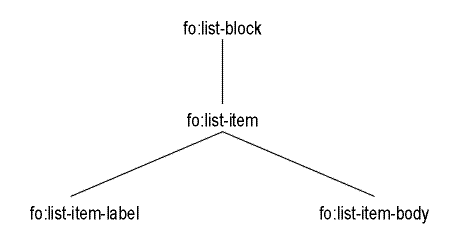
Tree representation of the formatting Objects for Lists. The fo:list-block has the role of containing the complete list and of specifying values used for the list geometry in the inline-progression-direction (see details below). The children of the fo:list-block are one or more fo:list-item, each containing a pair of fo:list-item-label and fo:list-item-body. The fo:list-item has the role of containing each item in a list. The fo:list-item-label has the role of containing the content, block-level formatting objects, of the label for the list-item; typically an fo:block containing a number, a dingbat character, or a term. The fo:list-item-body has the role of containing the content, block-level formatting objects, of the body of the list-item; typically one or more fo:block. The placement, in the block-progression-direction, of the label with respect to the body is made in accordance with the "vertical-align" property of the fo:list-item. 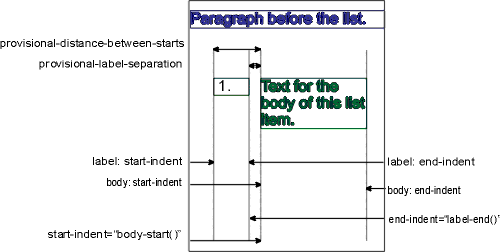
The specification of the list geometry in the inline-progression-direction is achieved by:
The start-indent of the list-item-label and end-indent of the list-item-body, if desired, are typically specified as a length. Examples[top]ExamplesEnumerated List[top]Enumerated ListThe list-items are contained in an The style is to enumerate the items alphabetically with a dot after the letter. Input sample: <ol> <item>List item 1.</item> <item>List item 2.</item> <item>List item 3.</item> </ol> XSL Stylesheet:
<?xml version='1.0'?>
<xsl:stylesheet xmlns:xsl="http://www.w3.org/1999/XSL/Transform"
                xmlns:fo="http://www.w3.org/1999/XSL/Format"
                version='1.0'>

<xsl:template match="ol">
  <fo:list-block provisional-distance-between-starts="15mm"
   provisional-label-separation="5mm">
    <xsl:apply-templates/>
  </fo:list-block>
</xsl:template>

<xsl:template match="ol/item">
  <fo:list-item>
    <fo:list-item-label start-indent="5mm" end-indent="label-end()">
      <fo:block>
        <xsl:number format="a."/>
      </fo:block>
    </fo:list-item-label>
    <fo:list-item-body start-indent="body-start()">
      <fo:block>
        <xsl:apply-templates/>
      </fo:block>
    </fo:list-item-body>
  </fo:list-item>
</xsl:template>

</xsl:stylesheet>
Result Instance: elements and attributes in the fo: namespace
<fo:list-block provisional-distance-between-starts="15mm"
  provisional-label-separation="5mm">

  <fo:list-item>
    <fo:list-item-label start-indent="5mm" end-indent="label-end()">
      <fo:block>a.
      </fo:block>
    </fo:list-item-label>
    <fo:list-item-body start-indent="body-start()">
      <fo:block>List item 1.
      </fo:block>
    </fo:list-item-body>
  </fo:list-item>

  <fo:list-item>
    <fo:list-item-label start-indent="5mm" end-indent="label-end()">
      <fo:block>b.
      </fo:block>
    </fo:list-item-label>
    <fo:list-item-body start-indent="body-start()">
      <fo:block>List item 2.
      </fo:block>
    </fo:list-item-body>
  </fo:list-item>

  <fo:list-item>
    <fo:list-item-label start-indent="5mm" end-indent="label-end()">
      <fo:block>c.
      </fo:block>
    </fo:list-item-label>
    <fo:list-item-body start-indent="body-start()">
      <fo:block>List item 3.
      </fo:block>
    </fo:list-item-body>
  </fo:list-item>

</fo:list-block>
HTML-style "dl" lists[top]HTML-style"dl" lists
In this example the stylesheet processes HTML-style Balanced pairs of
In other words, given a structure like this: <doc> <dl> <dt>term</dt> <dd>definition</dd> <dt>term</dt> <dt>term</dt> <dd>definition</dd> <dt>term</dt> <dd>definition</dd> <dd>definition</dd> </dl> </doc> If
<fo:list-block provisional-distance-between-starts="35mm"
  provisional-label-separation="5mm">
  <fo:list-item>
    <fo:list-item-label end-indent="label-end()">
      <fo:block>term
      </fo:block>
    </fo:list-item-label>
    <fo:list-item-body start-indent="body-start()">
      <fo:block>definition
      </fo:block>
    </fo:list-item-body>
  </fo:list-item>
  <fo:list-item>
    <fo:list-item-label end-indent="label-end()">
      <fo:block>term
      </fo:block>
      <fo:block>term
      </fo:block>
    </fo:list-item-label>
    <fo:list-item-body start-indent="body-start()">
      <fo:block>definition
      </fo:block>
    </fo:list-item-body>
  </fo:list-item>
  <fo:list-item>
    <fo:list-item-label end-indent="label-end()">
      <fo:block>term
      </fo:block>
    </fo:list-item-label>
    <fo:list-item-body start-indent="body-start()">
      <fo:block>definition
      </fo:block>
    </fo:list-item-body>
  </fo:list-item>
  <fo:list-item>
    <fo:list-item-label end-indent="label-end()">
    </fo:list-item-label>
    <fo:list-item-body start-indent="body-start()">
      <fo:block>definition
      </fo:block>
    </fo:list-item-body>
  </fo:list-item>
</fo:list-block>
If
<fo:list-block provisional-distance-between-starts="35mm"
  provisional-label-separation="5mm">
  <fo:list-item>
    <fo:list-item-label end-indent="label-end()">
      <fo:block>term
      </fo:block>
    </fo:list-item-label>
    <fo:list-item-body start-indent="body-start()">
      <fo:block>definition
      </fo:block>
    </fo:list-item-body>
  </fo:list-item>
  <fo:list-item>
    <fo:list-item-label end-indent="label-end()">
      <fo:block>term
      </fo:block>
      <fo:block>term
      </fo:block>
    </fo:list-item-label>
    <fo:list-item-body start-indent="body-start()">
      <fo:block>definition
      </fo:block>
    </fo:list-item-body>
  </fo:list-item>
  <fo:list-item>
    <fo:list-item-label end-indent="label-end()">
      <fo:block>term
      </fo:block>
    </fo:list-item-label>
    <fo:list-item-body start-indent="body-start()">
      <fo:block>definition
      </fo:block>
      <fo:block>definition
      </fo:block>
    </fo:list-item-body>
  </fo:list-item>
</fo:list-block>
XSL Stylesheet:
<?xml version='1.0'?>
<xsl:stylesheet xmlns:xsl="http://www.w3.org/1999/XSL/Transform"
                xmlns:fo="http://www.w3.org/1999/XSL/Format"
                version='1.0'>

<xsl:include href="dtdd.xsl"/>

<xsl:template match="doc">
  <xsl:apply-templates/>
</xsl:template>

<xsl:template match="dl">
  <xsl:call-template name="process.dl"/>
</xsl:template>

<xsl:template match="dt|dd">
  <fo:block>
    <xsl:apply-templates/>
  </fo:block>
</xsl:template>

</xsl:stylesheet>
Included stylesheet "dtdd.xsl"
<?xml version='1.0'?>
<xsl:stylesheet xmlns:xsl="http://www.w3.org/1999/XSL/Transform"
                xmlns:fo="http://www.w3.org/1999/XSL/Format"
                version='1.0'>

<xsl:variable name="allow-naked-dd" select="true()"/>

<xsl:template name="process.dl">
  <fo:list-block provisional-distance-between-starts="35mm"
   provisional-label-separation="5mm">
    <xsl:choose>
      <xsl:when test="$allow-naked-dd">
        <xsl:call-template name="process.dl.content.with.naked.dd"/>
      </xsl:when>
      <xsl:otherwise>
        <xsl:call-template name="process.dl.content"/>
      </xsl:otherwise>
    </xsl:choose>
  </fo:list-block>
</xsl:template>

<xsl:template name="process.dl.content.with.naked.dd">
  <xsl:param name="dts" select="./force-list-to-be-empty"/>
  <xsl:param name="nodes" select="*"/>

  <xsl:choose>
    <xsl:when test="count($nodes)=0">
      <!-- Out of nodes, output any pending DTs -->
      <xsl:if test="count($dts)>0">
        <fo:list-item>
          <fo:list-item-label end-indent="label-end()">
            <xsl:apply-templates select="$dts"/>
          </fo:list-item-label>
          <fo:list-item-body start-indent="body-start()"/>
        </fo:list-item>
      </xsl:if>
    </xsl:when>

    <xsl:when test="name($nodes[1])='dd'">
      <!-- We found a DD, output the DTs and the DD -->
      <fo:list-item>
        <fo:list-item-label end-indent="label-end()">
          <xsl:apply-templates select="$dts"/>
        </fo:list-item-label>
        <fo:list-item-body start-indent="body-start()">
          <xsl:apply-templates select="$nodes[1]"/>
        </fo:list-item-body>
      </fo:list-item>
      <xsl:call-template name="process.dl.content.with.naked.dd">
        <xsl:with-param name="nodes" select="$nodes[position()>1]"/>
      </xsl:call-template>
    </xsl:when>

    <xsl:when test="name($nodes[1])='dt'">
      <!-- We found a DT, add it to the list of DTs and loop -->
      <xsl:call-template name="process.dl.content.with.naked.dd">
        <xsl:with-param name="dts" select="$dts|$nodes[1]"/>
        <xsl:with-param name="nodes" select="$nodes[position()>1]"/>
      </xsl:call-template>
    </xsl:when>

    <xsl:otherwise>
      <!-- This shouldn't happen -->
      <xsl:message>
        <xsl:text>DT/DD list contained something bogus (</xsl:text>
        <xsl:value-of select="name($nodes[1])"/>
        <xsl:text>).</xsl:text>
      </xsl:message>
    </xsl:otherwise>
  </xsl:choose>
</xsl:template>

<xsl:template name="process.dl.content">
  <xsl:param name="dts" select="./force-list-to-be-empty"/>
  <xsl:param name="dds" select="./force-list-to-be-empty"/>
  <xsl:param name="output-on"></xsl:param>
  <xsl:param name="nodes" select="*"/>

  <!-- The algorithm here is to build up a list of DTs and DDs, -->
  <!-- outputing them only on the transition from DD back to DT -->

  <xsl:choose>
    <xsl:when test="count($nodes)=0">
      <!-- Out of nodes, output any pending elements -->
      <xsl:if test="count($dts)>0 or count($dds)>0">
        <fo:list-item>
          <fo:list-item-label end-indent="label-end()">
            <xsl:apply-templates select="$dts"/>
          </fo:list-item-label>
          <fo:list-item-body start-indent="body-start()">
            <xsl:apply-templates select="$dds"/>
          </fo:list-item-body>
        </fo:list-item>
      </xsl:if>
    </xsl:when>

    <xsl:when test="name($nodes[1])=$output-on">
      <!-- We're making the transition from DD back to DT -->
      <fo:list-item>
        <fo:list-item-label end-indent="label-end()">
          <xsl:apply-templates select="$dts"/>
        </fo:list-item-label>
        <fo:list-item-body start-indent="body-start()">
          <xsl:apply-templates select="$dds"/>
        </fo:list-item-body>
      </fo:list-item>

      <!-- Reprocess this node (and the rest of the node list) -->
      <!-- resetting the output-on state to nil -->
      <xsl:call-template name="process.dl.content">
        <xsl:with-param name="nodes" select="$nodes"/>
      </xsl:call-template>
    </xsl:when>

    <xsl:when test="name($nodes[1])='dt'">
      <!-- We found a DT, add it to the list and loop -->
      <xsl:call-template name="process.dl.content">
        <xsl:with-param name="dts" select="$dts|$nodes[1]"/>
        <xsl:with-param name="dds" select="$dds"/>
        <xsl:with-param name="nodes" select="$nodes[position()>1]"/>
      </xsl:call-template>
    </xsl:when>

    <xsl:when test="name($nodes[1])='dd'">
      <!-- We found a DD, add it to the list and loop, noting that -->
      <!-- the next time we cross back to DT's, we need to output the -->
      <!-- current DT/DDs. -->
      <xsl:call-template name="process.dl.content">
        <xsl:with-param name="dts" select="$dts"/>
        <xsl:with-param name="dds" select="$dds|$nodes[1]"/>
        <xsl:with-param name="output-on">dt</xsl:with-param>
        <xsl:with-param name="nodes" select="$nodes[position()>1]"/>
      </xsl:call-template>
    </xsl:when>

    <xsl:otherwise>
      <!-- This shouldn't happen -->
      <xsl:message>
        <xsl:text>DT/DD list contained something bogus (</xsl:text>
        <xsl:value-of select="name($nodes[1])"/>
        <xsl:text>).</xsl:text>
      </xsl:message>
    </xsl:otherwise>
  </xsl:choose>
</xsl:template>

</xsl:stylesheet>
The "dtdd.xsl" stylesheet may be customized in the following ways:
In the stylesheet using the "dtdd.xsl" stylesheet change the fo:list-block[top]fo:list-blockCommon Usage: The fo:list-block flow object is used to format a list. Areas: The fo:list-block formatting object generates one or more normal block-areas. The fo:list-block returns these areas, any page-level-out-of-line areas, and any reference-level-out-of-line areas returned by the children of the fo:list-block. Constraints: No area may have more than one normal child area returned by the same fo:list-block formatting object. The children of each normal area returned by an fo:list-block formatting object must be normal block-areas returned by the children of the fo:list-block, must be properly stacked, and must be properly ordered. Contents: (list-item+) In addition this formatting object may have a sequence of zero or more fo:markers as its initial children. The following properties apply to this formatting object:
fo:list-item[top]fo:list-itemCommon Usage: The fo:list-item formatting object contains the label and the body of an item in a list. Areas: The fo:list-item formatting object generates one or more normal block-areas. The fo:list-item returns these areas, any page-level-out-of-line areas, and any reference-level-out-of-line areas returned by the children of the fo:list-item. Constraints: No area may have more than one normal child area returned by the same fo:list-item formatting object. The children of each normal area returned by an fo:list-item formatting object must be normal block-areas returned by the fo:list-item-label and the fo:list-item-body flow objects and must be properly ordered. Those returned by the fo:list-item-label must be properly stacked and those returned by the fo:list-item-body must be properly stacked. The children of each normal area returned by an fo:list-item formatting object returned by the fo:list-item-label and fo:list-item-body objects are positioned in the block-progression-direction with respect to each other according to the relative-align trait. In the inline-progression-direction these areas are positioned in the usual manner for properly stacked areas. It is an error if the content-rectangles of the areas overlap. The block-progression-dimension of the content-rectangle of an area generated by the fo:list-item is just large enough so that the allocation-rectangles of all its child areas are contained in it. In particular, the space-before and space-after of the child areas have no effect on the spacing of the list item. For purposes of the block-stacking constraints the areas generated by fo:list-item are treated as if there they have a fence preceding and a fence following them. NOTE: Contents: (list-item-label,list-item-body) In addition this formatting object may have a sequence of zero or more fo:markers as its initial children. The following properties apply to this formatting object:
fo:list-item-body[top]fo:list-item-bodyCommon Usage: The fo:list-item-body formatting object contains the content of the body of a list-item. Areas: The fo:list-item-body formatting object does not generate any areas. The fo:list-item-body formatting object returns the sequence of areas created by concatenating the sequences of areas returned by each of the children of the fo:list-item-body. Constraints: The order of concatenation of the sequences of areas returned by the children of the fo:list-item-body is the same order as the children are ordered under the fo:list-item-body. Contents: (%block;)+ In addition this formatting object may have a sequence of zero or more fo:markers as its initial children. The following properties apply to this formatting object: fo:list-item-label[top]fo:list-item-labelCommon Usage: The fo:list-item-label formatting object contains the content of the label of a list-item, typically used to either enumerate, identify, or adorn the list-item's body. Areas: The fo:list-item-label formatting object does not generate any areas. The fo:list-item-label formatting object returns the sequence of areas created by concatenating the sequences of areas returned by each of the children of the fo:list-item-label. Constraints: The order of concatenation of the sequences of areas returned by the children of the fo:list-item-label is the same order as the children are ordered under the fo:list-item-label. Contents: (%block;)+ In addition this formatting object may have a sequence of zero or more fo:markers as its initial children. The following properties apply to this formatting object: |