
Table of contentsAppendices |
4.1 IntroductionIntroductionThe formatter generates an ordered tree, the area tree, which describes a geometric structuring of the output medium. The terms child, sibling, parent, descendant, and ancestor refer to this tree structure. The tree has a root node. Each area tree node other than the root is called an area and is associated to a rectangular portion of the output medium. Areas are not formatting objects; rather, a formatting object generates zero or more rectangular areas, and normally each area is generated by a unique object in the formatting object tree. NOTE: An area has a content-rectangle, the portion in which its child areas are assigned, and optional padding and border. The diagram shows how these portions are related to one another. The outer bound of the border is called the border-rectangle, and the outer bound of the padding is called the padding-rectangle. 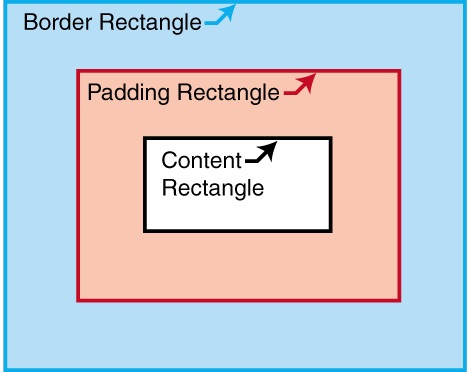
Each area has a set of traits, a mapping of names to values, in the way elements have attributes and formatting objects have properties. Individual traits are used either for rendering the area or for defining constraints on the result of formatting, or both. Traits used strictly for formatting purposes or for defining constraints may be called formatting traits, and traits used for rendering may be called rendering traits. Traits whose values are copied or derived from a property of the same or a corresponding name are listed in [property-index] and [refinement] ; other traits are listed below. NOTE: The semantics of each type of formatting object that generates areas are given in terms of which areas it generates and their place in the area-tree hierarchy. This may be further modified by interactions between the various types of formatting objects. The properties of the formatting object determine what areas are generated and how the formatting object's content is distributed among them. (For example, a word that is not to be hyphenated may not have its glyphs distributed into areas on two separate line-areas.) The traits of an area are either: directly-derived: the values of directly-derived traits are the computed value of a property of the same or a corresponding name on the generating formatting object, or indirectly-derived: the values of indirectly-derived traits are the result of a computation involving the computed values of one or more properties on the generating formatting object, other traits on this area or other interacting areas (ancestors, parent, siblings, and/or children) and/or one or more values constructed by the formatter. The calculation formula may depend on the type of the formatting object. This description assumes that refined values have been computed for all properties of formatting objects in the result tree, i.e., all relative and corresponding values have been computed and the inheritable values have been propagated as described in [refinement] . This allows the process of inheritance to be described once and avoids a need to repeat information on computing values in this description. The indirectly-derived traits are: block-progression-direction, inline-progression-direction, shift-direction, glyph-orientation, is-reference-area, is-viewport-area, left-position, right-position, top-position, bottom-position, left-offset, top-offset, is-first, is-last, alignment-point, area-class, start-intrusion-adjustment, end-intrusion-adjustment, generated-by, returned-by, page-number, blink, underline-score, overline-score, through-score, underline-score-color, overline-score-color, through-score-color, alignment-baseline, baseline-shift, nominal-font, dominant-baseline-identifier, actual-baseline-table, and script. |