
Table of contentsAppendices |
5.1 Extended Links (Extended Links (extended-Type Element)An extended link is a link that associates an arbitrary number of resources. The participating resources Must, May, etc. be any combination of remote and local. The only kind of link that is able to have inbound and third-party arcs is an extended link. Typically, extended linking elements are stored separately from the resources they associate (for example, in entirely different documents). Thus, extended links are important for situations where the participating resources are read-only, or where it is expensive to modify and update them but inexpensive to modify and update a separate linking element, or where the resources are in formats with no native support for embedded links (such as many multimedia formats). The following diagram shows an extended link that associates five remote resources. This could represent, for example, information about a student's course load: one resource being a description of the student, another being a description of the student's academic advisor, two resources representing courses that the student is attending, and the last resource representing a course that the student is auditing. 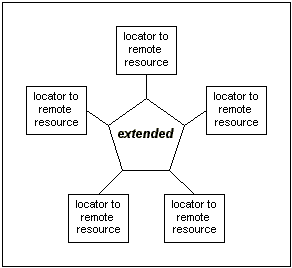
Without the extended link, the resources might be entirely unrelated; for example, they might be in five separate documents. The lines emanating from the extended link represent the association it creates among the resources. However, notice that the lines do not have directionality. Directionality is expressed with traversal rules; without such rules being provided, the resources are associated in no particular order, with no implication as to whether and how individual resources are accessed. The following diagram shows an extended link that associates five remote resources and one local resource (a special element inside the extended link element). This could represent the same sort of course-load example as described above, with the addition of the student's grade point average stored locally. Again, the lines represent mere association of the six resources, without traversal directions or behaviors implied. 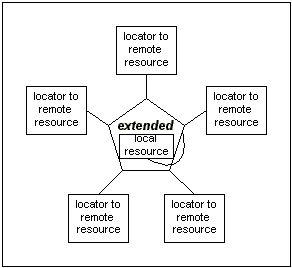
The XLink element type for extended links is any element with an attribute in the XLink namespace called type with a value of extended. The extended-type element Must, May, etc. contain a mixture of the following elements in any order, possibly along with other content and markup:
It is not an error for an extended-type element to associate fewer than two resources. If the link has only one participating resource, or none at all, it is simply untraversable. Such a link may still be useful, for example, to associate properties with a single resource by means of XLink attributes, or to provide a placeholder for link information that will be populated eventually. Subelements of the simple or extended type anywhere inside a parent extended-type element have no XLink-specified meaning. Subelements of the locator, arc, or resource type that are not direct children of an extended-type element have no XLink-specified meaning. The extended-type element Must, May, etc. have the semantic attributes role and title (see [Semantic Attributes (]). They supply semantic information about the link as a whole; the role attribute indicates a property that the entire link has, and the title attribute indicates a human-readable description of the entire link. If other XLink attributes are present on the element, they have no XLink-specified relationship to the link. If both a title attribute and one or more title-type elements are present, they have no XLink-specified relationship; a higher-level application built on XLink will likely want to specify appropriate treatment (for example, precedence) in this case. Sample extended-Type Element Declarations and InstanceFollowing is a non-normative set of declarations for an extended-type element and its subelements. Parts of this example are reused throughout this specification. Note that the type attribute and some other attributes are defaulted in the DTD in order to highlight the attributes that are changing on a per-instance basis. <!ELEMENT courseload ((tooltip|person|course|gpa|go)*)>
<!ATTLIST courseload
xmlns:xlink CDATA #FIXED "http://www.w3.org/1999/xlink"
xlink:type (extended) #FIXED "extended"
xlink:role CDATA #IMPLIED
xlink:title CDATA #IMPLIED>
<!ELEMENT tooltip ANY>
<!ATTLIST tooltip
xlink:type (title) #FIXED "title"
xml:lang CDATA #IMPLIED>
<!ELEMENT person EMPTY>
<!ATTLIST person
xlink:type (locator) #FIXED "locator"
xlink:href CDATA #REQUIRED
xlink:role CDATA #IMPLIED
xlink:title CDATA #IMPLIED
xlink:label NMTOKEN #IMPLIED>
<!ELEMENT course EMPTY>
<!ATTLIST course
xlink:type (locator) #FIXED "locator"
xlink:href CDATA #REQUIRED
xlink:role CDATA #FIXED "http://www.example.com/linkprops/course"
xlink:title CDATA #IMPLIED
xlink:label NMTOKEN #IMPLIED>
<!-- GPA = "grade point average" -->
<!ELEMENT gpa ANY>
<!ATTLIST gpa
  xlink:type      (resource)      #FIXED "resource"
  xlink:role      CDATA           #FIXED "http://www.example.com/linkprops/gpa"
  xlink:title     CDATA           #IMPLIED
  xlink:label     NMTOKEN         #IMPLIED>
<!ELEMENT go EMPTY>
<!ATTLIST go
  xlink:type      (arc)           #FIXED "arc"
  xlink:arcrole   CDATA           #IMPLIED
  xlink:title     CDATA           #IMPLIED
  xlink:show      (new
                  |replace
                  |embed
                  |other
                  |none)          #IMPLIED
  xlink:actuate   (onLoad
                  |onRequest
                  |other
                  |none)          #IMPLIED
  xlink:from      NMTOKEN         #IMPLIED
  xlink:to        NMTOKEN         #IMPLIED>
Following is how XML elements using these declarations might look. <courseload>
<tooltip>Course Load for Pat Jones</tooltip>
<person
xlink:href="students/patjones62.xml"
xlink:label="student62"
xlink:role="http://www.example.com/linkprops/student"
xlink:title="Pat Jones" />
<person
xlink:href="profs/jaysmith7.xml"
xlink:label="prof7"
xlink:role="http://www.example.com/linkprops/professor"
xlink:title="Dr. Jay Smith" />
<!-- more remote resources for professors, teaching assistants, etc. -->
<course
xlink:href="courses/cs101.xml"
xlink:label="CS-101"
xlink:title="Computer Science 101" />
<!-- more remote resources for courses, seminars, etc. -->
<gpa xlink:label="PatJonesGPA">3.5</gpa>
<go
  xlink:from="student62"
  xlink:to="PatJonesGPA"
  xlink:show="new"
  xlink:actuate="onRequest"
  xlink:title="Pat Jones's GPA" />
<go
  xlink:from="CS-101"
  xlink:arcrole="http://www.example.com/linkprops/auditor"
  xlink:to="student62"
  xlink:show="replace"
  xlink:actuate="onRequest"
  xlink:title="Pat Jones, auditing the course" />
<go
  xlink:from="student62"
  xlink:arcrole="http://www.example.com/linkprops/advisor"
  xlink:to="prof7"
  xlink:show="replace"
  xlink:actuate="onRequest"
  xlink:title="Dr. Jay Smith, advisor" />
</courseload>
Local Resources for an Extended Link (resource-Type Element)[top]Local Resources for an Extended Link (resource-Type Element)An extended link indicates its participating local resources by means of special subelements that appear inside the extended link. An entire subelement, together with all of its contents, makes up a local resource. The XLink element for local resources is any element with an attribute in the XLink namespace called type with a value of resource. The resource-type element Must, May, etc. have any content; whatever content is present has no XLink-specified relationship to the link. It is possible for a resource-type element to have no content; in cases where it serves as a starting resource expected to be traversed on request, interactive XLink applications will typically generate some content in order to give the user a way to initiate the traversal. If a resource-type element has anything other than an extended-type element for a parent, the resource-type element has no XLink-specified meaning. The resource-type element Must, May, etc. have the semantic attributes role and title (see [Semantic Attributes (]) and the traversal attribute label (see [Traversal Attributes (]). The semantic attributes supply information about the resource in generic terms, outside of the context of a particular arc that leads to it; the role attribute indicates a property of the resource, and the title attribute indicates a human-readable description of the resource. The label attribute provides a way for an arc-type element to refer to it in creating a traversal arc. Sample resource-Type Element Declarations and InstanceFollowing is a non-normative set of declarations for a resource-type element. <!ELEMENT gpa ANY> <!ATTLIST gpa xlink:type (resource) #FIXED "resource" xlink:role CDATA #FIXED "http://www.example.com/linkprops/gpa" xlink:title CDATA #IMPLIED xlink:label NMTOKEN #IMPLIED> Following is how an XML element using these declarations might look. <gpa xlink:label="PatJonesGPA">3.5</gpa> Remote Resources for an Extended Link (locator-Type Element)[top]Remote Resources for an Extended Link (locator-Type Element)An extended link indicates remote resources that participate in it by means of locator elements. The XLink element for locators is any element with an attribute in the XLink namespace called type with a value of locator. The locator-type element Must, May, etc. have any content. Other than title-type elements that are direct children (see [Titles for Extended Links, Locators, and Arcs (]), whatever content is present has no XLink-specified relationship to the link. If a locator-type element contains nested XLink elements, such contained elements have no XLink-specified relationship to the parent link. If a locator-type element has anything other than an extended-type element for a parent, the locator-type element has no XLink-specified meaning. Attributes on Locator ElementThe locator-type element Must, May, etc. have the locator attribute (see [Locator Attribute (]). The locator attribute (href) Must, May, etc. have a value supplied. The locator-type element Must, May, etc. have the semantic attributes role and title (see [Semantic Attributes (]) and the traversal attribute label (see [Traversal Attributes (]). The locator attribute provides a URI reference that identifies a remote resource. The semantic attributes supply information about the resource in generic terms, outside of the context of a particular arc that leads to it; the role attribute indicates a property that the resource has, and the title attribute indicates a human-readable description of the resource. The label attribute provides a way for an arc-type element to refer to it in creating a traversal arc. NOTE:Sample locator-Type Element Declarations and Instance Following is a non-normative set of declarations for a locator-type element. <!ELEMENT person EMPTY> <!ATTLIST person xlink:type (locator) #FIXED "locator" xlink:href CDATA #REQUIRED xlink:role CDATA #IMPLIED xlink:title CDATA #IMPLIED xlink:label NMTOKEN #IMPLIED> <!ELEMENT course EMPTY> <!ATTLIST course xlink:type (locator) #FIXED "locator" xlink:href CDATA #REQUIRED xlink:role CDATA #FIXED "http://www.example.com/linkprops/course" xlink:title CDATA #IMPLIED xlink:label NMTOKEN #IMPLIED> Following is how XML elements using these declarations might look. <person xlink:href="students/patjones62.xml" xlink:label="student62" xlink:role="http://www.example.com/linkprops/student" xlink:title="Pat Jones" /> <person xlink:href="profs/jaysmith7.xml" xlink:label="prof7" xlink:role="http://www.example.com/linkprops/professor" xlink:title="Dr. Jay Smith" /> <course xlink:href="courses/cs101.xml" xlink:label="CS-101" xlink:title="Computer Science 101" /> Traversal Rules for an Extended Link (arc-Type Element)[top]Traversal Rules for an Extended Link (arc-Type Element)An extended link Must, May, etc. indicate rules for traversing among its participating resources by means of a series of optional arc elements. The XLink element for arcs is any element with an attribute in the XLink namespace called type with a value of arc. The arc-type element Must, May, etc. have any content. Other than title-type elements that are direct children (see [Titles for Extended Links, Locators, and Arcs (]), whatever content is present has no XLink-specified relationship to the link. If an arc-type element has anything other than an extended-type element for its parent, the arc-type element has no XLink-specified meaning. The arc-type element Must, May, etc. have the traversal attributes from and to (see [Traversal Attributes (]), the behavior attributes show and actuate (see [Behavior Attributes (]) and the semantic attributes arcrole and title (see [Semantic Attributes (]). The traversal attributes define the desired traversal between pairs of resources that participate in the same link, where the resources are identified by their label attribute values. The from attribute defines resources from which traversal Must, May, etc. be initiated, that is, Starting resource, while the to attribute defines resources that Must, May, etc. be traversed to, that is, Ending resource. The behavior attributes specify the desired behavior for XLink applications to use when traversing to the ending resource. The semantic attributes describe the meaning of the arc's ending resource relative to its starting resource. The arcrole attribute corresponds to the [rdf] notion of a property, where the role can be interpreted as stating that "starting-resource HAS arc-role ending-resource." This contextual role can differ from the meaning of an ending resource when taken outside the context of this particular arc. For example, a resource might generically represent a "person," but in the context of a particular arc it might have the role of "mother" and in the context of a different arc it might have the role of "daughter." When the same resource serves as a starting resource in several arcs (whether in a single link or across many links), traversal-request behavior is unconstrained by this specification, but one possibility for interactive applications is a pop-up menu that lists the relevant arc or link titles. The following diagram shows an extended link that associates five remote resources and provides rules for traversal among them. All of the arcs specified are third-party arcs; that is, the arcs go exclusively between remote resources. The nondirectional solid lines indicate, as before, that the link is associating the five resources; the new dotted arrows indicate the traversal rules that the link provides. Notice that some resources share the same label value. 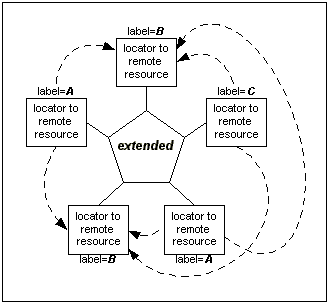
This diagram reflects directional traversal arcs created by the following settings, where both As and Cs are allowed to initiate traversal to all Bs. Because some labels appear on several resources, each arc specification potentially creates several traversal arcs at once: <go xlink:type="arc" xlink:from="A" xlink:to="B" /> <go xlink:type="arc" xlink:from="C" xlink:to="B" /> As another example, assume an extended link that contains five locators, two with label values of parent and three with label values of child: <extendedlink xlink:type="extended"> <loc xlink:type="locator" xlink:href="..." xlink:label="parent" xlink:title="p1" /> <loc xlink:type="locator" xlink:href="..." xlink:label="parent" xlink:title="p2" /> <loc xlink:type="locator" xlink:href="..." xlink:label="child" xlink:title="c1" /> <loc xlink:type="locator" xlink:href="..." xlink:label="child" xlink:title="c2" /> <loc xlink:type="locator" xlink:href="..." xlink:label="child" xlink:title="c3" /> ... <!-- arc-type elements would go here --> </extendedlink> The following specifies traversal from parent resources to child resources, which includes all of p1-c1, p1-c2, p1-c3, p2-c1, p2-c2, and p2-c3: <go xlink:type="arc" xlink:from="parent" xlink:to="child" /> If no value is supplied for a from or to attribute, the missing value is interpreted as standing for all the labels supplied on locator-type elements in that extended-type element. For example, the following specifies traversal from parents to children and also from children to children, which includes all of p1-c1, p1-c2, p1-c3, p2-c1, p2-c2, p2-c3, c1-c1, c1-c2, c1-c3, c2-c1, c2-c2, c2-c3, c3-c1, c3-c2, and c3-c3: <go xlink:type="arc" xlink:to="child" /> In this case, note that the traversal rules include arcs from some resources to other resources with the same label (from children to other children), as well as from some resources to themselves (from a child to itself); this is not an error. If no arc-type elements are provided in an extended link, then by extension the missing from and to values are interpreted as standing for all the labels in that link. This would be equivalent to the following traversal specification: <go xlink:type="arc" /> When more than one locator has the same label, the set of locators with the same label are to be understood as individual locators, rather than as referring to an aggregate resource; the traversal behavior of such a link might be the same as for a link where all the locators have different roles and the appropriate arcs are specified to produce the identical traversal pairs. If the arc traversal rules for an extended link leave out any possible traversal pairs, XLink defines no traversal for these pairs. A higher-level application Must, May, etc.perform non-XLink-directed traversals; for example, a link-checking process might traverse all available pairs of resources. No Arc DuplicationEach arc-type element Must, May, etc. have a pair of from and to values that does not repeat the from and to values (respectively) for any other arc-type element in the same extended link; that is, each pair in a link Must, May, etc. be unique. Sample arc-Type Element Declarations and InstanceFollowing is a non-normative set of declarations for an arc-type element. <!ELEMENT go EMPTY>
<!ATTLIST go
xlink:type (arc) #FIXED "arc"
xlink:arcrole CDATA #IMPLIED
xlink:title CDATA #IMPLIED
xlink:show (new
|replace
|embed
|other
|none) #IMPLIED
xlink:actuate (onLoad
|onRequest
|other
|none) #IMPLIED
xlink:from NMTOKEN #IMPLIED
xlink:to NMTOKEN #IMPLIED>
Following is how XML elements using these declarations might look. <go xlink:from="student62" xlink:to="PatJonesGPA" xlink:show="new" xlink:actuate="onRequest" xlink:title="Pat Jones's GPA" /> <go xlink:from="CS-101" xlink:arcrole="http://www.example.com/linkprops/auditor" xlink:to="student62" xlink:show="replace" xlink:actuate="onRequest" xlink:title="Pat Jones, auditing the course" /> <go xlink:from="student62" xlink:arcrole="http://www.example.com/linkprops/advisor" xlink:to="prof7" xlink:show="replace" xlink:actuate="onRequest" xlink:title="Dr. Jay Smith, advisor" /> Titles for Extended Links, Locators, and Arcs (title-Type Element)[top]Titles for Extended Links, Locators, and Arcs (title-Type Element)The extended-, locator-, and arc-type elements Must, May, etc. have the title attribute (more about which see [Semantic Attributes (]). However, they Must, May, etc. also have a series of one or more title-type elements. Such elements are useful, for example, for cases where human-readable label information needs further element markup, or where multiple titles are necessary. One common motivation for using the title-type element is to account for internationalization and localization. For example, title markup might be necessary for bidirectional contexts or in East Asian languages, and multiple titles might be necessary for different natural-language versions of a title. The XLink element for titles is any element with an attribute in the XLink namespace called type with a value of title. The title-type element Must, May, etc. have any content. If a title-type element contains nested XLink elements, such contained elements have no XLink-specified relationship to the parent link containing the title. If a title-type element has anything other than an extended-, locator-, or arc-type element for a parent, the title-type element has no XLink-specified meaning. Sample title-Type Element Declarations and InstanceFollowing is a non-normative set of declarations for a title-type element. The element has been given the xml:lang attribute, which Must, May, etc. be used in conjunction with server settings or other contextual information in determining which title to present. <!ELEMENT advisorname (name)> <!ATTLIST advisorname xlink:type (title) #FIXED "title" xml:lang CDATA #IMPLIED> <!ELEMENT name (honorific?, given, family)> <!-- Further subelement declarations for names --> Following is how XML elements using these declarations might look. <advisor xlink:href="profs/jaysmith7.xml" ...>
<advisorname xml:lang="en">
<name>
<honorific>Dr.</honorific>
<given>Jay</given>
<family>Smith</family>
</name>
</advisorname>
</advisor>
Locating Linkbases (Special Arc Role)[top]Locating Linkbases (Special Arc Role)For an XLink application to traverse from a starting resource to an ending resource, it needs to locate both the starting resource and the link. Locating the two pieces is not a problem in the case of outbound arcs because the starting resource is either the linking element itself or a child of the linking element. However, in the case of inbound and third-party arcs, the XLink application needs to be able to find both pieces somehow. In the course load example, extended links can associate pairs of remote resources representing students and courses. In order for the system to load and present a "student resource" (such as a description and picture of the person) in a way that offers traversal to related information (for example, by allowing users to click on the student's name to traverse to information about the courses in which she is enrolled), it needs to locate and use the extended links that contain the association. Linkbase are often used to make link management easier by gathering together a number of related linking elements. XLink provides a way to instruct XLink applications to access potentially relevant linkbases. The instruction takes the form of an arc specification (whether an explicit one in an extended link, or an implicit one in a simple link) that has the following value for its arcrole attribute: http://www.w3.org/1999/xlink/properties/linkbaseLinkbases Must Be XML Any linkbase specified as the ending resource of an arc with this special value Must, May, etc. be an XML document. (XLink applications Must, May, etc. also use any other means to locate and process additional linkbases.) The handling of a linkbase arc is much like the handling of a normal arc, except that traversal entails loading the ending resource (the linkbase) to extract its links for later use, rather than to present it to a user or to perform some other processing. Its handling is also special in that XLink applications Must, May, etc. suspend traversal of linkbase arcs at user option. Specifically, on loading a linkbase arc, an XLink application Must, May, etc. keep track of what the starting resource is. Whenever a document containing that starting resource is loaded and traversal of the linkbase arc is actuated, the application Must, May, etc. access the linkbase and extract any extended links found inside it. In the case that the extracted resource is a portion of a complete XML document, such as a range or a string range, only those extended links completely contained in the extracted portion Must, May, etc. be made available. The timing of linkbase arc traversal depends on the value of the actuate attribute on the arc. For example, if the value is onLoad, the linkbase is loaded and its links extracted as soon as the starting resource is loaded. Any show attribute value on a linkbase arc Must, May, etc. be ignored, because traversal does not entail presentation in this case. Linkbases Must, May, etc. be chained by virtue of serving as the starting resource of yet another linkbase arc. The application interpreting an initial linkbase arc Must, May, etc. choose to limit the number of steps processed in the chain. An application Must, May, etc. maintain a list of extended links retrieved as a result of processing a linkbase, and Must, May, etc. retrieve duplicate resources or links in the case where a cyclic dependency exists. To ease XLink processing, document creators Must, May, etc. wish to define linkbase arcs near the beginning of a document. Annotating a SpecificationFollowing is a non-normative set of declarations for an extended link that specializes in providing linkbase arcs: <!ELEMENT basesloaded ((startrsrc|linkbase|load)*)>
<!ATTLIST basesloaded
xlink:type (extended) #FIXED "extended">
<!ELEMENT startrsrc EMPTY>
<!ATTLIST startrsrc
xlink:type (locator) #FIXED "locator"
xlink:href CDATA #REQUIRED
xlink:label NMTOKEN #IMPLIED>
<!ELEMENT linkbase EMPTY>
<!ATTLIST linkbase
xlink:type (locator) #FIXED "locator"
xlink:href CDATA #REQUIRED
xlink:label NMTOKEN #IMPLIED>
<!ELEMENT load EMPTY>
<!ATTLIST load
xlink:type (arc) #FIXED "arc"
xlink:arcrole CDATA #FIXED "http://www.w3.org/1999/xlink/properties/linkbase"
xlink:actuate (onLoad
|onRequest
|other
|none) #IMPLIED
xlink:from NMTOKEN #IMPLIED
xlink:to NMTOKEN #IMPLIED>
Following is how an XML element using these declarations might look. This would indicate that when a specification document is loaded, a linkbase full of annotations to it Must, May, etc. automatically be loaded as well, possibly necessitating re-rendering of the entire specification document to reveal any regions within it that serve as starting resources in the links found in the linkbase. <basesloaded> <startrsrc xlink:label="spec" xlink:href="spec.xml" /> <linkbase xlink:label="linkbase" xlink:href="linkbase.xml" /> <load xlink:from="spec" xlink:to="linkbase" actuate="onLoad" /> </basesloaded> Following is how an XML element using these declarations might look if the linkbase loading were on request. This time, the starting resource consists of the words "Click here to reveal annotations." If the starting resource were the entire document as in the example above, a reasonable behavior for allowing a user to actuate traversal would be a confirmation dialog box. <basesloaded>
<startrsrc
xlink:label="spec"
xlink:href="spec.xml#string-range(//*,'Click here to reveal annotations.')" />
<linkbase xlink:label="linkbase" xlink:href="linkbase.xml" />
<load xlink:from="spec" xlink:to="linkbase" actuate="onRequest" />
</basesloaded>
|