Cart
Cart
|
Home > Online Product Documentation > Table of Contents > Generating Formatting Objects Generating Formatting ObjectsYou can use Stylus Studio to develop a stylesheet that generates XSL Formatting Objects (FO). In the scenario in which you apply such a stylesheet, you can specify that Stylus Studio should run a Formatting Objects Processor (FOP) on the stylesheet's result document. When you apply the stylesheet and preview the results, Stylus Studio displays the formatted results. Stylus Studio includes The Apache Software Organization's FOP, and it is configured to always generate PDF. If you want to run a FOP to generate some other type of output, you must specify some other FOP in the Custom post-process fields of the Post-process tab of the Scenario Properties dialog box.
Stylus Studio includes two sample stylesheets that generate formatting objects. These files are in the
This section covers the following topics:
Developing Stylesheets That Generate FO
To develop a stylesheet that generates FO:
1. Define the scenario in which you want to apply the stylesheet that generates FO. See
Creating a Scenario.
2. In the
Scenario Properties dialog box, in the
Post-process tab, do one of the following:
The Apache FOP included with Stylus Studio is configured to convert FO XML into PDF. Stylus Studio then uses Acrobat Reader to display the PDF in the Stylus Studio preview window.
3. In the XSLT editor, define a stylesheet that generates FO. As soon as you type
<fo:, Stylus Studio displays a completion menu of FO that you can select from.
4. Apply the stylesheet to an XML document.
After Stylus Studio transforms the XML document to generate a result XML document that contains formatting objects, Stylus Studio automatically runs the FOP you specified on the result document. Stylus Studio then displays the postprocess result in the XSLT Preview window. Troubleshooting FOP ErrorsIf the transformation works well, but the FOP generates an error, obtain a copy of RenderX's Unofficial DTD for XSL Formatting Objects. You can find this at http://www.renderx.com. Although this DTD is not official (it is more limited than what the W3C XSL recommendation defines), it is a helpful debugging tool. To validate the generated XML against this DTD:
1. Copy the DTD to a location such as
C:\fo.dtd.
2. Include a document type declaration, such as the following, in your generated document:
3. Turn off postprocessing.
4. Apply the stylesheet.
5. Save the resulting XML document.
6. Open the saved XML document in Stylus Studio.
7. Click
Validate Document
 .
.
Viewing the FO Sample ApplicationTo view the FO sample application included with Stylus Studio:
1. In Stylus Studio, open the
examples\XSLFormattingObjects\minimal-catalog.xsl file in your Stylus Studio installation directory.
Alternative: If the Stylus Studio
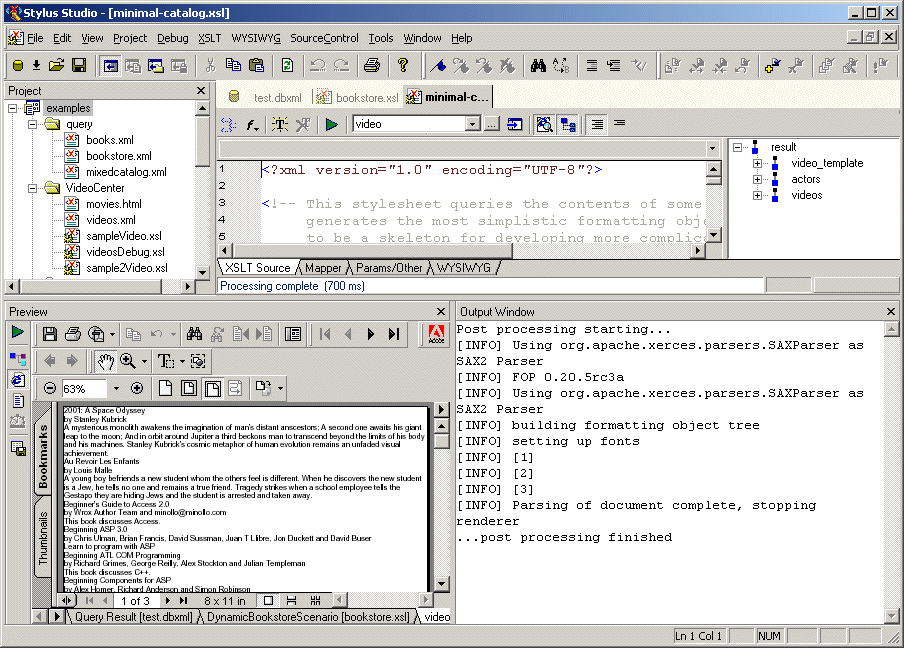
The
In this scenario, Stylus Studio selects elements to operate on from three different documents. These documents are in the
2. Click
Preview Result
 . As you can see, the
Output Window shows some postprocessing information messages.
. As you can see, the
Output Window shows some postprocessing information messages.
After a few seconds, the Preview window displays the PDF result in Acrobat Reader. The result contains a few lines of text for each video and book found in the XML source documents. The title, author or director, and the description is included for each item. It is hard to see where information for one item ends and another begins.
3. Examine the stylesheet. It contains the minimum FO instructions required to generate FO. There is no formatting to make the result document easier to read. You can use this stylesheet as a skeleton for creating your own stylesheets that generate FO.
4. Now open the
examples\XSLFormattingObjects\catalog.xsl stylesheet.
5. Click
Preview Result
.
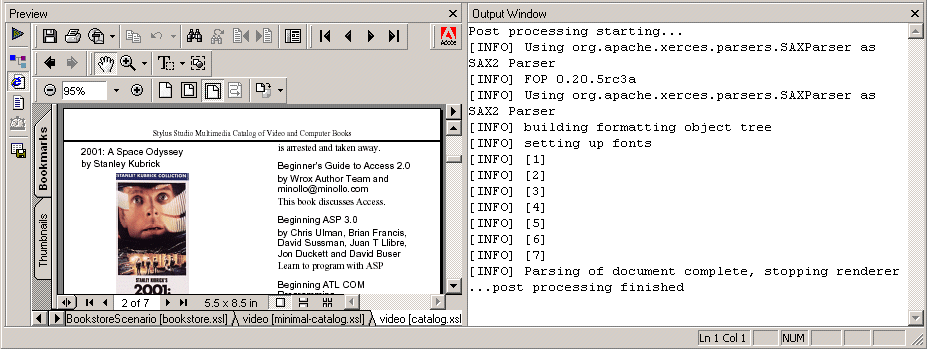
This time the PDF result in the
Preview window is nicely formatted. The
Deploying Stylesheets That Generate FOWhen your stylesheet is complete, the process for creating a final document, such as a PDF document, from an XML document is as follows:
1. Apply a stylesheet to an XML document. This results in an XML document that contains XSL FO.
2. Run a FOP, such as Apache's FOP, and use the generated XML as input.
ExampleYou can accomplish both steps with a single invocation of FOP on the command line. For example:
Replace
Using Apache FOP to Generate NonPDF OutputThe Apache FOP included with Stylus Studio is configured to output PDF. To use this FOP to generate some other type of output:
1. Open the stylesheet whose results you want to postprocess with the Apache FOP.
2. Create or open a scenario in which to do the postprocessing. See
Creating a Scenario. Stylus Studio displays the
Scenario Properties dialog box.
3. In the
Scenario Properties dialog box, click the
Post-process tab.
4. Select
Custom post-process.
5. In the
Command line field, enter something like the following:
Modify this sample command line according to where Stylus Studio is installed and what kind of output you want the FOP to generate. The last option,
6. In the
Generated file extension field, specify the extension that indicates the type of output you want. For example, specify
.txt if you want the FOP to generate a text file.
7. If there is additional path information that the FOP will require to execute successfully, type it in the
Additional path field.
8. Click OK.
|

XML PRODUCTIVITY THROUGH INNOVATION ™