 Cart
Cart
|
Home > Online Product Documentation > Table of Contents > Getting Started with Queries Getting Started with QueriesThis section provides information to get you started using queries. It does not provide complete information about how to define a query. Instead, it provides instructions for defining typical queries you might want to run. There are numerous cross-references to later sections that provide complete information about a particular query construct. The topics discussed in this section include Obtaining All Marked-Up TextWhen you query a document, you do not usually want to obtain all marked-up text. However, an understanding of queries that return all marked-up text makes it easier to define a query that retrieves just what you want.
The following figure shows a complete query (
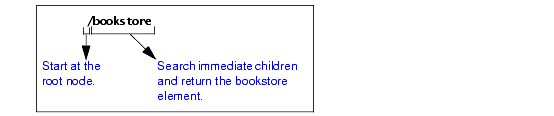
This query returns the
In the query, the initial forward slash (/) instructs the XPath processor to start its search at the root node.
Suppose you run the following query on
This query returns an empty set. It searches the immediate children of the root node for an element named
Obtaining a Portion of an XML DocumentUsually, you use a query to obtain a portion of an XML document. To obtain the particular elements that you want, you must understand how to obtain an element that is a child of the document element. With this information, you can obtain any elements in the document.
The following figure shows how the XPath processor interprets the
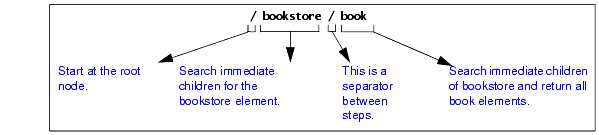
When the XPath processor starts its search at the root node, there is only one element among the immediate children of the root node. This is the document element. In this example,
The query in this figure returns the
Now you can define queries that obtain any elements you want. For example:
This query returns
Obtaining All Elements of a Particular NameSometimes you want all like-named elements regardless of where they are in a document. In this case, you do not need to start at the root node and navigate to the elements you want.
For example, the following query returns all
The double forward slash (//) at the beginning of a query instructs the XPath processor to start at the root node and search the entire document. In other words, the XPath processor searches all descendants of the root node.
If you perform this query on
Obtaining All Elements of a Particular Name from aAlthough sometimes you might want all like-named elements wherever they are in a document, other times you might want only those like-named elements from a particular part of the document (branch of the tree).
For example, you might want all
This query returns all
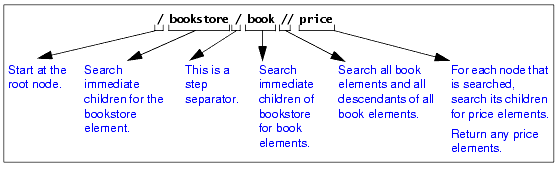
Different Results from Similar QueriesSome queries can look very similar but return very different results. The following figure shows this. 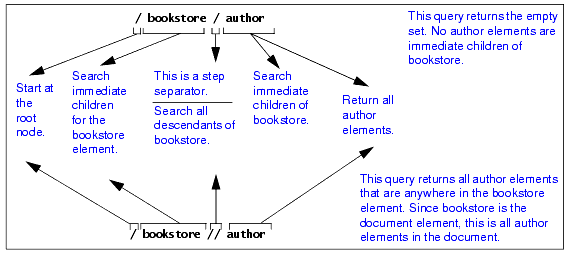
Queries That Return More Than You WantSuppose you want the titles of all the books. You might decide to define your query like this:
This query does return all titles of books, but it also returns the title of a magazine. This query instructs the XPath processor to start at the root node, search all descendants, and return all
To query and obtain only the titles of books, you can use either of the following queries. They obtain identical results. However, the first query runs faster.
The first query runs faster because it uses the
Specifying Attributes in QueriesTo specify an attribute name in a query, precede the attribute name with an at sign (@). The XPath processor treats elements and attributes in the same way wherever possible. For example:
This query returns the
Following is another query that includes an attribute:
This query returns the three
The following query returns the
If the context node does not have a
The next query returns the
Following is an example that is not valid because attributes cannot have subelements:
Following is a query that finds the
RestrictionsAttributes cannot contain subelements. Consequently, you cannot apply a path operator to an attribute. If you try to, you receive a syntax error. Attributes are inherently unordered. Consequently, you cannot apply a position number to an attribute. If you try to, you receive a syntax error. Attributes and WildcardsYou can use an at sign (@) and asterisk (*) together to retrieve a collection of attributes. For example, the following query finds all attributes in the current context:
Filtering Results of QueriesSometimes you want to retrieve only those elements that meet a certain condition. For example, you might want information about a particular book. In this case, you can include a filter in your query. You enclose filters in brackets ( [ ] ). The following figure shows how the XPath processor interprets a query with a filter: 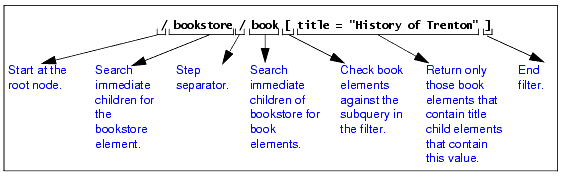
This query checks each
The following topics provide details about filters: Quotation Marks in FiltersSuppose you define the following filter:
If you need to specify this filter as part of an attribute value, use single quotation marks instead of double quotation marks. This is because the attribute value itself is (usually) inside double quotation marks. For example:
Strings within an expression may contain special characters such as [, {, &, `, /, and others, as long as the entire string is enclosed in double quotes ("). When the string itself contains double quotes, you may enclose it in single quotes ('). When a string contains both single and double quotes, you must handle these segments of the string as if they were individual phrases, and concatenate them. More Filter Examples
Following is another example of a query with a filter clause. This query returns
The next query returns
The next query returns the
The next query returns
How the XPath Processor Evaluates a FilterYou can apply constraints and branching to a query by specifying a filter clause. The filter contains a query, which is called the subquery. The subquery evaluates to a Boolean value, or to a numeric value. The XPath processor tests each element in the current context to see if it satisfies the subquery. The result includes only those elements that test true for the subquery.
The XPath processor always evaluates filters with respect to a context. For example, the expression
The next query returns all titles of books in the current context that have at least one excerpt:
Multiple Filters
You can specify any number of filters in any level of a query expression. Empty filters
A query that contains one or more filters returns the rightmost element that is not in a filter clause. For example:
The previous query returns
The following query finds each
The next query returns all books in the current context that have an excerpt and a title:
Filters and Attributes
Following is a query that finds all child elements of the current context with
The following query returns all
The next query finds all
Wildcards in QueriesIn a query, you can include an asterisk (*) to represent all elements. For example:
This query searches for all
The * collection returns all elements that are children of the context node, regardless of their tag names.
The next query finds all
The following query returns the grandchild elements of the current context.
Restrictions
Usually, the asterisk (*) returns only elements. It does not return processing instructions, attributes, or comments, nor does it include attributes or comments when it maintains a count of nodes. For example, the following query returns
Wildcards in strings are not allowed. For example, you cannot define a query such as the following:
AttributesTo use a wildcard for attributes, you can specify @*. For example:
For each
Calling Functions in QueriesThe XPath processor provides many functions that you can call in a query. This section provides some examples to give you a sense of how functions in queries work. Many subsequent sections provide information about invoking functions in queries. For a complete list of the functions you can call in a query, see XPath Functions Quick Reference.
Following is a query that returns a number that indicates how many
In format descriptions, a question mark that follows an argument indicates that the argument is optional. For example:
This function returns a string. The name of the function is
Case Sensitivity and Blank Spaces in QueriesQueries are case sensitive. This applies to every part of the query, including operators, strings, element and attribute names, and function names. For example, suppose you try this query:
This query returns an empty set because the name of the document element is
Blank spaces in queries are not significant unless they appear within quotation marks. Precedence of Query OperatorsThe precedence of query operators varies for XPath 1.0 and XPath 2.0, as shown in the following tables. In these tables, operators are listed in order of precedence, with highest precedence being first; operators in a given row have the same precedence.
|

XML PRODUCTIVITY THROUGH INNOVATION ™


