Cart
Cart|
|
Home > Online Product Documentation > Table of Contents > Testing a Web Service Testing a Web ServiceYou can test a Web service from within Stylus Studio. Testing allows you to quickly and easily
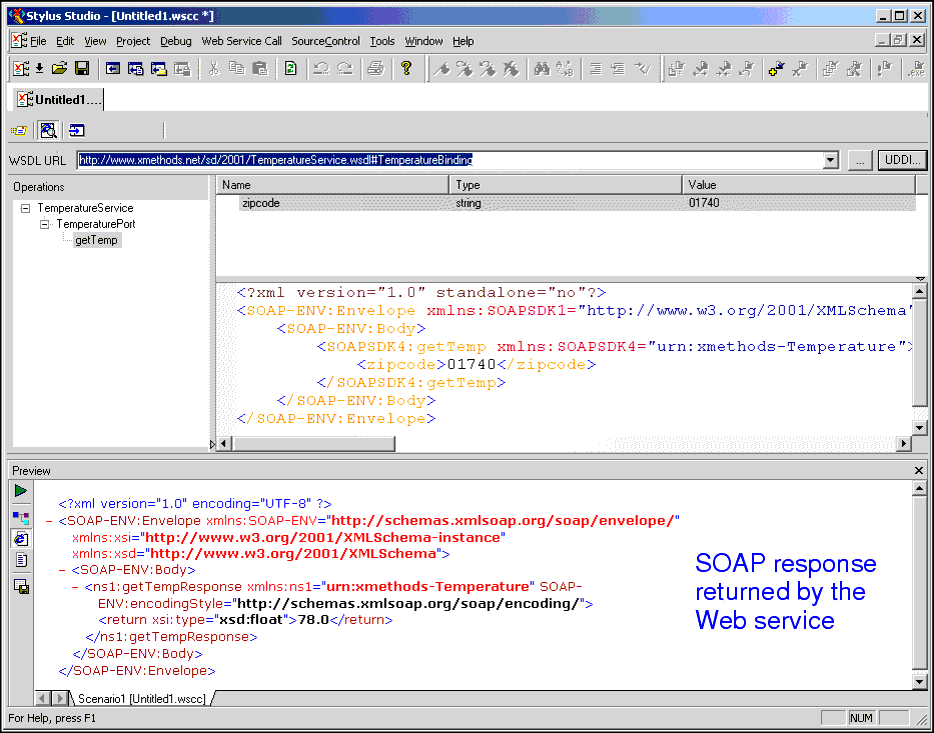
What Happens When You Test a Web ServiceWhen you test a Web service, Stylus Studio submits the SOAP request to the WSDL URL specified in the Web service call. The result, when it is returned, is displayed in the Preview window of the Web Service Call Composer. By default, Stylus Studio uses the HTTP transport protocol to submit the SOAP request to the WSDL server. Stylus Studio uses the proxy server specified on the local machine if one has been configured. Other Options for Testing a Web ServiceIn addition to testing a Web service as described in this section, you can also create a Web service call scenario. Web service call scenarios allow you to See Creating a Web Service Call Scenario to learn more about Web service call scenarios. How to Test a Web Service
To test a Web service, click the Send Request button (
|

XML PRODUCTIVITY THROUGH INNOVATION ™
 ) to submit the SOAP request.