Cart
Cart|
|
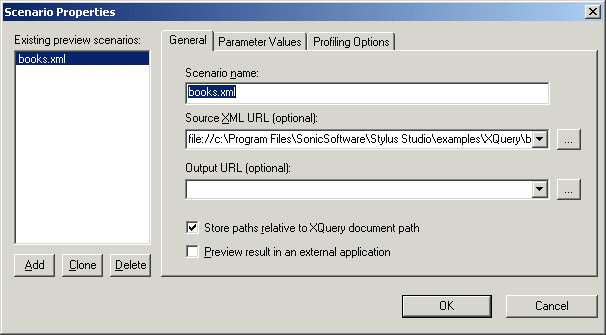
Home > Online Product Documentation > Table of Contents > Overview of Scenario Features Overview of Scenario FeaturesThis section describes the main features of XQuery scenarios. It covers the following topics: Specifying XML Source DocumentsThe main benefit of the XQuery scenario feature is that it lets you specify the XML document against which you want to run your XQuery. By default, Stylus Studio uses the first source document you add using the XQuery mapper as the XML source document for the scenario. You can specify the XML source document setting on the General tab of the Scenario Properties dialog box.
For more informationSee Source Documents to learn more about the process of selecting and working with XQuery source documents in XQuery mapper. Setting Values for External VariablesThe Parameter Values tab of the Scenario Properties dialog box displays any external variables you have defined in the XQuery source. You can specify the parameter value you want to use for any external variables when you run the scenario. For example, imagine your XQuery code contains the following:
This variable is displayed on the Parameters tab as follows:
When you run the scenario, you can specify the parameter value you want to use by double-clicking the Expression field and typing a value. Valid values are XPath expressions and must be entered using single or double quotes. Performance Metrics ReportingSee Enabling the Profiler to learn more about the different ways in which Stylus Studio can provide you with XQuery performance metrics. |

XML PRODUCTIVITY THROUGH INNOVATION ™