Home >
Online Product Documentation >
Table of Contents >
Working with XML Schema in Stylus Studio
Working with XML Schema in Stylus Studio
You use the
XML Schema Editor to view, define, and validate XML Schema using one or more of four tabs, or views. The
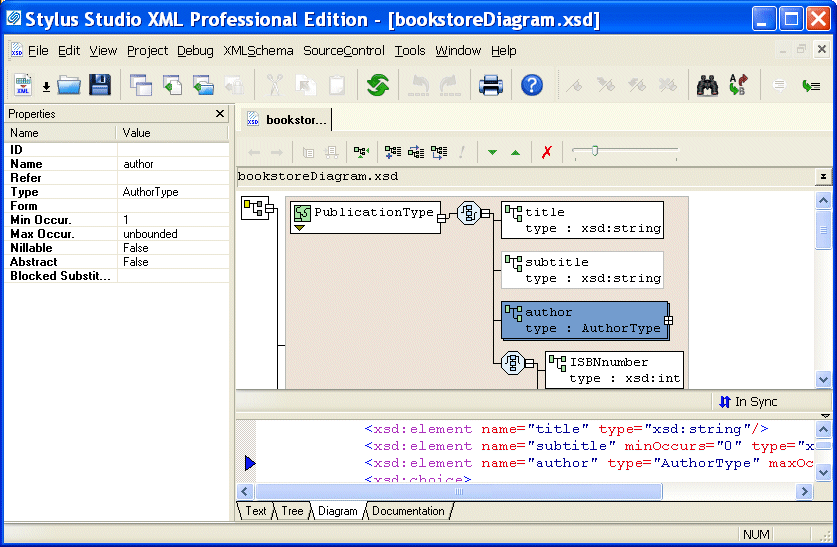
Diagram tab is shown in
Figure 212.
|
|
Figure 212. XML Schema Editor Diagram Tab
Each tab displays the schema from a unique perspective, as summarized here:
-
Text - Displays the raw XML text used to define the XML Schema. In addition to full editing support, features of the
Text tab include checkers for well-formedness and validation, as well as a query functionality that lets you evaluate your query using either XPath 1.0 or XPath 2.0. XML Schema query is also supported in the
Tree tab. The steps for editing the
Text view of an XML Schema are the same as for any other XML document. See
Updating XML Documents Using the Text Editor.
-
Tree - Displays a DOM tree representation of the XML Schema. You can edit the XML Schema graphically, in the tree itself, or by modifying the properties of the nodes you select.
-
Diagram - Displays the XML Schema using graphical elements for the nodes (elements, attributes, simpleTypes, complexTypes, and so on) defined in the XML Schema. A text pane lets you see how the changes you make in the diagram affect the XML Schema text.
-
Documentation - Displays read-only summary and detailed reference information about the XML Schema, including sections for schema document properties, global declarations, and global definitions.
When working with XML Schema in Stylus Studio, you can use whichever view (or views) you prefer - Stylus Studio keeps all the view synchronized automatically. If you are just getting started with XML Schema, consider using the
Diagram tab. Its graphical user interface makes defining XML Schema easy and error-free, and the
Diagram tab's built-in text pane, which lets you see how new nodes are rendered in XML, can be a useful learning tool. To get started using the
Diagram view to define an XML Schema, see
Defining an XML Schema Using the Diagram Tab - Getting Started. Procedures for working with the
Diagram tab are also covered throughout this chapter.
 Cart
Cart